Tải APK an toàn và nhanh chóng trên APKPure
APKPure sử dụng xác minh chữ ký để đảm bảo tải APK miễn phí virus cho Screen Text Widget.

Trang trí và Làm đẹp màn hình di động của bạn với TEXT CỦA BẠN bởi Screen Text Widget
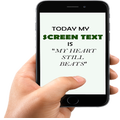
Screen Text Widget App provides you the widget on the screen where you can display you own text (YES, YOUR OWN TEXT, QUOTES, MEMOS, DAILY REMAINDER ETC) or anything that you like to appear on your mobile screen. You can change color of text, size of text with the settings page.
Steps to follow
1. Install the Screen Text App.
2. Go to the widgets
3. Drag the screen Text App icon from widgets to your screen where you like to place it.
4. Warm Welcome screen will appear, Press OK button to continue
5. Your Screen Text will appear on the screen.
6. Just click on the Text on the screen and change the settings.
7. Mission Accomplished
Thanks




Một cú nhấp chuột để cài đặt các tệp XAPK/APK trên Android!

Cảm ơn bạn đã xếp hạng và phản hồi của bạn!
Bạn đã đánh giá.