Güvenli ve Hızlı APK İndirmeleri APKPure'de
APKPure, virüssüz Screen Text Widget APK indirmelerini sağlamak için imza doğrulaması kullanır.

Süslemeleri ve Ekran Metni Widget tarafından KENDİ METİN ile Cep ekranı Güzelleştirmek
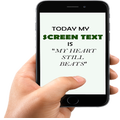
Screen Text Widget App provides you the widget on the screen where you can display you own text (YES, YOUR OWN TEXT, QUOTES, MEMOS, DAILY REMAINDER ETC) or anything that you like to appear on your mobile screen. You can change color of text, size of text with the settings page.
Steps to follow
1. Install the Screen Text App.
2. Go to the widgets
3. Drag the screen Text App icon from widgets to your screen where you like to place it.
4. Warm Welcome screen will appear, Press OK button to continue
5. Your Screen Text will appear on the screen.
6. Just click on the Text on the screen and change the settings.
7. Mission Accomplished
Thanks




XAPK/APK dosyalarını Android'e yüklemek için tek tıkla!

Derecelendirme ve geri bildiriminiz için teşekkürler!
Zaten derecelendirdin.