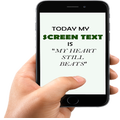
Screen Text Widget

Screen Text Widget

Jb Digital World
Apr 7, 2018
  • 4.8 MB

    Ukuran file

  • Everyone

  • Android 4.1+

    Android OS

Tentang Screen Text Widget

Menghias dan mempercantik layar Cell dengan TEXT ANDA SENDIRI oleh Layar Text Widget

Screen Text Widget App provides you the widget on the screen where you can display you own text (YES, YOUR OWN TEXT, QUOTES, MEMOS, DAILY REMAINDER ETC) or anything that you like to appear on your mobile screen. You can change color of text, size of text with the settings page.

Steps to follow

1. Install the Screen Text App.

2. Go to the widgets

3. Drag the screen Text App icon from widgets to your screen where you like to place it.

4. Warm Welcome screen will appear, Press OK button to continue

5. Your Screen Text will appear on the screen.

6. Just click on the Text on the screen and change the settings.

7. Mission Accomplished

Thanks

Tampilkan Selengkapnya

What's new in the latest 1.0

Last updated on Apr 7, 2018
Minor bug fixes and improvements. Install or update to the newest version to check it out!
Tampilkan Selengkapnya

Video dan tangkapan layar

  • Screen Text Widget untuk Trailer Android resmi
  • Screen Text Widget screenshot 1
  • Screen Text Widget screenshot 2
  • Screen Text Widget screenshot 3
  • Screen Text Widget screenshot 4
  • Screen Text Widget screenshot 5
  • Screen Text Widget screenshot 6
  • Screen Text Widget screenshot 7

Informasi APK Screen Text Widget

Versi terbaru
1.0
Kategori
Alat
Android OS
Android 4.1+
Ukuran file
4.8 MB
Rating konten
Everyone
Unduh APK dengan Aman dan Cepat di APKPure
APKPure menggunakan verifikasi tanda tangan untuk memastikan unduhan APK Screen Text Widget yang bebas dari virus untuk Anda.

Versi lama Screen Text Widget

ikon APKPure

Pengunduhan Super cepat dan aman melalui aplikasi APKPure

Sekali klik untuk menginstal file XAPK/APK di Android!

Unduh APKPure
thank icon
We use cookies and other technologies on this website to enhance your user experience.
By clicking any link on this page you are giving your consent to our Privacy Policy and Cookies Policy.
Learn More about Policies