APKPure에서 안전하고 빠른 APK 다운로드
APKPure는 바이러스 없는 Screen Text Widget APK 다운로드를 위해 서명 확인을 사용합니다.

장식 및 화면 텍스트 위젯으로 자신의 텍스트와 셀 화면을 아름답게
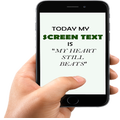
Screen Text Widget App provides you the widget on the screen where you can display you own text (YES, YOUR OWN TEXT, QUOTES, MEMOS, DAILY REMAINDER ETC) or anything that you like to appear on your mobile screen. You can change color of text, size of text with the settings page.
Steps to follow
1. Install the Screen Text App.
2. Go to the widgets
3. Drag the screen Text App icon from widgets to your screen where you like to place it.
4. Warm Welcome screen will appear, Press OK button to continue
5. Your Screen Text will appear on the screen.
6. Just click on the Text on the screen and change the settings.
7. Mission Accomplished
Thanks



등급과 피드백에 감사드립니다!
당신은 이미 평가했습니다.