APKPure で安全で高速な APK のダウンロード
APKPure は署名検証を使用して、ウイルスフリーの Screen Text Widget APK ダウンロードを保証します。

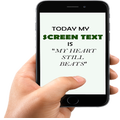
画面のテキストウィジェットにより、独自のテキストとあなたの携帯画面を飾ると美しく
Screen Text Widget App provides you the widget on the screen where you can display you own text (YES, YOUR OWN TEXT, QUOTES, MEMOS, DAILY REMAINDER ETC) or anything that you like to appear on your mobile screen. You can change color of text, size of text with the settings page.
Steps to follow
1. Install the Screen Text App.
2. Go to the widgets
3. Drag the screen Text App icon from widgets to your screen where you like to place it.
4. Warm Welcome screen will appear, Press OK button to continue
5. Your Screen Text will appear on the screen.
6. Just click on the Text on the screen and change the settings.
7. Mission Accomplished
Thanks



あなたの評価とフィードバックをありがとう!
すでに評価しました。