Safe & Fast APK Downloads on APKPure
APKPure uses signature verification to ensure virus-free Zlink Android Auto APK downloads for you.

Mirror your android device with the car screen Zlink carplay android auto
Connect, drive, and enjoy - Zlink carplay android auto brings it all to your dashboard.
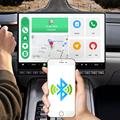
Zlink carplay integrates your android device with your car’s infotainment system ensuring that your smartphone can be easily connected to your car via Bluetooth, USB & Cast options. The app provides Zlink carplay android auto sync and brings your android device’s features to your car dashboard. The app provides seamless integration with Zlink android auto auto enabling you to access navigation, messages and more directly from the car dashboard. Zlink carplay provides you an improved experience making it easy to navigate while driving.
With Zlink carplay android auto compatibility our app provides you a seamless and intuitive experience. Zlink carplay android provides you all the features which you need for a safer driving experience including speedometer, driving mode, weather forecast and map navigation. With seamless maps integration, enjoy real-time navigation, now enhanced for Zlink android auto.
Key Features of Zlink android auto:
1.Driving Mode:
Zlink carplay android auto improved driving mode with contacts, calls, speedometer and map on the dashboard helps you keep your focus on the road. Important data like time, date and speed of your vehicle can also be seen in the Driving Mode. With an easy access to contacts, zlink carplay for android auto allows you to quickly make calls while staying focused on the road.
2. Weather Forecast:
The weather forecast feature of zlink carplay android offers real-time updates to keep you prepared for any kind of weather conditions on the road. It displays the current weather and temperature of your location. With the weather forecast option in the zlink andriod auto, you can also access weekly forecast for your current location. The zlink carplay android auto also allows you to check the weather in various cities.
3. My Garage:
With the personal garage feature in carplay android, you can manage all of your vehicles in one location and quickly access all of the information about them at any time.
4.Car Information:
Get a useful car information feature about maintenance for old cars, car modification, tire maintenance and engine diagnostics.
5. Speedometer:
You can monitor your vehicle’s speed using the speedometer feature directly at your dashboard. The speedometer feature of zlink carplay android auto displays average speed, total distance travelled and average fuel usage.
6. Navigation:
zlink carplay app for android offers you a smooth navigation experience. Finding locations like nearby gas stations, car repair spot and hospital is made easy with zlink android auto.
Zlink carplay android auto supports a wide range of car models providing important features across various car brands.
Note: Unlock the advanced features of “Speedometer” & “Garage” with our premium plan to enjoy a more personalized driving experience.



One-click to install XAPK/APK files on Android!

Thanks for your rating and feedback!
You have already rated.






