APKPure پر محفوظ اور تیز APK ڈاؤن لوڈ کریں
APKPure آپ کے لئے وائرس سے پاک Remote Camera Client APK ڈاؤن لوڈ میسر کرنے کے لئے سائنیچر تصدیق استعمال کرتا ہے۔

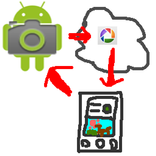
Send shoot command to "Remote Camera" app and receive a picture taken.
*You need another device in which "remote camera" installed.
You can shoot with another device's camera and view the picture taken remotely.
How to use
1. Install "remote camera" into another device and keep running the "remote camera" app.
2. Run this app
3. Fill [phone#] field with phone number of the device "remote camera" is running.
4. Fill [keyword] field with the keyword specified in "remote camera" app.
5. Click green camera icon, and wait for a while. It takes few minutes.
6. The picture taken will be shown.



Android پر XAPK/APK فائلیںانسٹالکرنےکےلیےایککلککریں!

آپ کی درجہ بندی اور آراء کا شکریہ!
آپ پہلے ہی درجہ بندی کر چکے ہیں۔