在APKPure安全快速地下載APK
APKPure 使用簽章驗證功能,確保為您提供無病毒的 Remote Camera Client APK 下載。

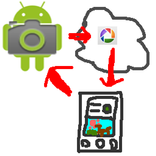
送拍命令“遠程攝像機”應用程序接收拍攝的照片。
*You need another device in which "remote camera" installed.
You can shoot with another device's camera and view the picture taken remotely.
How to use
1. Install "remote camera" into another device and keep running the "remote camera" app.
2. Run this app
3. Fill [phone#] field with phone number of the device "remote camera" is running.
4. Fill [keyword] field with the keyword specified in "remote camera" app.
5. Click green camera icon, and wait for a while. It takes few minutes.
6. The picture taken will be shown.



感謝您的評分和反饋!
您已經評分了。