Safe & Fast APK Downloads on APKPure
APKPure uses signature verification to ensure virus-free SC Sound Command Demo APK downloads for you.

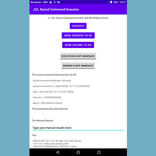
Demonstrating the execution of sound commands from dolphins via DC app.
This version is in test mode and may not work properly on all devices that it can be installed on, due to changes in most recent versions of Android. Please report issues to sergemasse1@yahoo.com
Designed to demonstrate the execution of custom sound commands emitted by dolphins (or others) and captured and recognized in real-time by the DC Dolphin Communicator app, also for Android. The human user can define the frequencies of a sound command in DC, a dolphin or other participant emits the sound command, DC recognizes it in real-time, sends it to this app, which executes the programmed logic for it, and sends the results back to DC.
Using this app as an example, Android programmers can write their own app to process customized sound command via DC.
The present app is also designed to demonstrate the effectiveness of DC for implementing sound commands and automated responses to dolphin signals. This may be useful in an authentic sanctuary to help ensure the health of the animals under care.
How to test the custom sound command feature:
1. Install DC app (free from Google Play, no ads)
2. Install CustomSoundCommandDemo app (from Google Play, no ads)
3. run DC (optionally also CustomSoundCommandDemo)
4. in DC, select the SELF-TEST button
5. In the edit text field to the left of the EMIT button, type sc-test
(the name of the hard-coded sound command for testing this new feature)
6. Select the EMIT button
this will play the sc-test whistle which is hard-coded and designed to trigger
the transmission of the command (sc-test) to CustomSoundCommandDemo;
The name of CustomSoundCommandDemo is defined in a setting that can be edited to use your own
app name later.
The app CustomSoundCommandDemo is run and is shown by Android.
7. Select the EXECUTE button which will generate a test text in the results field.
8. Select the SEND SUCCESS TO DC button, and this will send the results back to DC.
9. DC's special activity CustomSoundCommandResultsReceiver will show up.
The results will also be shown in the main screen text (the chat text, aka. console)
10. Select the CLOSE button.
This will close the screen and show the CustomSoundCommandDemo which is behind it in the stack.
11. Use the back key to show DC main screen.
The results are in the text.



One-click to install XAPK/APK files on Android!

Thanks for your rating and feedback!
You have already rated.