Безопасная и Быстрая Загрузка APK на APKPure
APKPure позволяет легко и безопасно загружать NetPad APK с проверкой подписи.

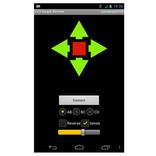
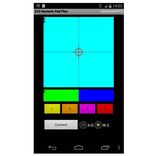
Сеть дистанционного управления для отправки информации о положении на микроконтроллер.
The purpose of the app is to control remote hardware like Arduino, Netduino, Raspberry Pi ...
The protocol is TCP/IP (Client).
3 positions are handled either as text or bytes.
The range of the values x,y (1. control) and z (2. control) are between -100 and 100.
Byte Mode: 3 positions are transfered as 3 bytes (default)
ASCII Mode: 3 positions are transfered as text seperated by comma (ended by \n)
Session inactive: Each transmission in a serated connection
Session active: Connection never closed, but if necessary automatic reconnect (default)
Zero inactive: No return to zero values after release
Zero active: Auto return to zero values after release
The purpose of the app is to control remote hardware like Arduino, Netduino, Raspberry Pi ...
V1.1:
- Changed default mode
- Session to hold connection
V1.2:
- Tablet modifications
V1.3:
- Zero: Auto return to zero values on/off
- Remember last settings
V1.4
- Improved TCP/IP connection
Sample code for a server on Raspberry Pi:
#include "stdio.h"
#include "stdlib.h"
#include "string.h"
#include "unistd.h"
#include "sys/types.h"
#include "sys/socket.h"
#include "netinet/in.h"
void error(const char *msg)
{
perror(msg);
exit(1);
}
int main(int argc, char *argv[])
{
int sockfd, newsockfd, portno,n;
socklen_t clilen;
char buffer[256];
struct sockaddr_in serv_addr, cli_addr;
sockfd = socket(AF_INET, SOCK_STREAM, 0);
if (sockfd < 0)
error("ERROR opening socket");
bzero((char *) &serv_addr, sizeof(serv_addr));
portno = 12345;
serv_addr.sin_family = AF_INET;
serv_addr.sin_addr.s_addr = INADDR_ANY;
serv_addr.sin_port = htons(portno);
if (bind(sockfd, (struct sockaddr *)
&serv_addr, sizeof(serv_addr)) < 0)
error("ERROR on binding");
while(1)
{
listen(sockfd,5);
clilen = sizeof(cli_addr);
newsockfd = accept(sockfd, (struct sockaddr *)
&cli_addr, &clilen);
if (newsockfd < 0)
error("ERROR on accept");
while(1)
{
bzero(buffer,256);
n = read(newsockfd,buffer,3);
if (n < 3)
{
error("ERROR reading from socket");
break;
}
float tmp1 = (float)buffer[0];
if (tmp1 > 127)
tmp1 -= 256;
float tmp2 = (float)buffer[1];
if (tmp2 > 127)
tmp2 -= 256;
float tmp3 = (float)buffer[2];
if (tmp3 > 127)
tmp3 -=256;
printf("%d %d %d\n",(int)tmp1,(int)tmp2,(int)tmp3);
}
close(newsockfd);
}
close(sockfd);
return 0;
}



Один клик для установки XAPK/APK файлов на Android!

Спасибо за оценки и отзывы!
Вы уже оценили.