تنزيلات APK آمنة وسريعة على موقع APKPure
يستخدم APKPure التحقق من التوقيع لضمان تقديم تنزيلات خالية من الفيروسات لـ NetPad APK لك.

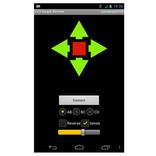
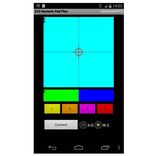
شبكة التحكم عن بعد لإرسال معلومات الموقع إلى متحكم.
The purpose of the app is to control remote hardware like Arduino, Netduino, Raspberry Pi ...
The protocol is TCP/IP (Client).
3 positions are handled either as text or bytes.
The range of the values x,y (1. control) and z (2. control) are between -100 and 100.
Byte Mode: 3 positions are transfered as 3 bytes (default)
ASCII Mode: 3 positions are transfered as text seperated by comma (ended by \n)
Session inactive: Each transmission in a serated connection
Session active: Connection never closed, but if necessary automatic reconnect (default)
Zero inactive: No return to zero values after release
Zero active: Auto return to zero values after release
The purpose of the app is to control remote hardware like Arduino, Netduino, Raspberry Pi ...
V1.1:
- Changed default mode
- Session to hold connection
V1.2:
- Tablet modifications
V1.3:
- Zero: Auto return to zero values on/off
- Remember last settings
V1.4
- Improved TCP/IP connection
Sample code for a server on Raspberry Pi:
#include "stdio.h"
#include "stdlib.h"
#include "string.h"
#include "unistd.h"
#include "sys/types.h"
#include "sys/socket.h"
#include "netinet/in.h"
void error(const char *msg)
{
perror(msg);
exit(1);
}
int main(int argc, char *argv[])
{
int sockfd, newsockfd, portno,n;
socklen_t clilen;
char buffer[256];
struct sockaddr_in serv_addr, cli_addr;
sockfd = socket(AF_INET, SOCK_STREAM, 0);
if (sockfd < 0)
error("ERROR opening socket");
bzero((char *) &serv_addr, sizeof(serv_addr));
portno = 12345;
serv_addr.sin_family = AF_INET;
serv_addr.sin_addr.s_addr = INADDR_ANY;
serv_addr.sin_port = htons(portno);
if (bind(sockfd, (struct sockaddr *)
&serv_addr, sizeof(serv_addr)) < 0)
error("ERROR on binding");
while(1)
{
listen(sockfd,5);
clilen = sizeof(cli_addr);
newsockfd = accept(sockfd, (struct sockaddr *)
&cli_addr, &clilen);
if (newsockfd < 0)
error("ERROR on accept");
while(1)
{
bzero(buffer,256);
n = read(newsockfd,buffer,3);
if (n < 3)
{
error("ERROR reading from socket");
break;
}
float tmp1 = (float)buffer[0];
if (tmp1 > 127)
tmp1 -= 256;
float tmp2 = (float)buffer[1];
if (tmp2 > 127)
tmp2 -= 256;
float tmp3 = (float)buffer[2];
if (tmp3 > 127)
tmp3 -=256;
printf("%d %d %d\n",(int)tmp1,(int)tmp2,(int)tmp3);
}
close(newsockfd);
}
close(sockfd);
return 0;
}



قم بتثبيت ملفات XAPK/APK بنقرة واحدة على أندرويد!

شكرًا لتقييمك وتعليقاتك!
لقد أكملت التقييم سابقًا