Safe & Fast APK Downloads on APKPure
APKPure uses signature verification to ensure virus-free Digital USB Microscope App APK downloads for you.

Learn setup, calibration, and usage tips for compatible USB digital microscopes.
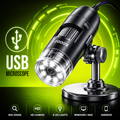
Digital USB Microscope App is an educational guide designed to help Android users understand the setup, calibration, and everyday use of compatible USB digital microscopes. Whether you're connecting a microscope for the first time or learning how to capture clear images, this app provides simple, step-by-step guidance.
Explore helpful information about microscope installation, focusing techniques, calibration, lighting adjustments, and common troubleshooting tips through an easy-to-use interface.
Features
Setup Guide
Learn how to connect compatible USB digital microscopes to supported devices with clear installation instructions.
Calibration Assistance
Understand how to calibrate your microscope for accurate measurements and improved viewing results.
Microscope Usage Tips
Discover best practices for focusing, adjusting magnification, using LED lighting, and capturing detailed images.
Troubleshooting Help
Find practical solutions for common connection, calibration, image quality, and compatibility issues.
Educational Content
Access organized guides covering portable USB microscopes, digital microscope accessories, and everyday applications.
Simple Interface
Navigate through tutorials and reference materials using a lightweight and user-friendly design.
Why Choose Digital USB Microscope App?
Step-by-step setup guidance
Calibration tutorials
USB microscope usage tips
Helpful troubleshooting information
Lightweight and easy to navigate
Designed for Android users
Getting Started
Install Digital USB Microscope App.
Open the application.
Browse setup and calibration guides.
Learn about compatible USB digital microscope features.
Follow the provided educational instructions.
Helpful Topics
USB digital microscope setup
Portable digital USB microscope guide
Digital microscope calibration
USB microscope installation
Digital microscope focusing tips
Magnification and image quality
LED microscope lighting
Educational microscope reference
Important Information
This application is intended for educational and informational purposes only. It does not provide microscope control, hardware drivers, firmware updates, or official device management. Features and compatibility may vary depending on your microscope model and Android device.
Disclaimer
Digital USB Microscope App is an independent educational application and is not affiliated with, endorsed by, or sponsored by any microscope manufacturer or brand. All trademarks, product names, and brand names are the property of their respective owners and are used solely for identification, compatibility, and educational reference purposes.



One-click to install XAPK/APK files on Android!

Thanks for your rating and feedback!
You have already rated.