












Thanks for your rating and feedback!
You have already rated.

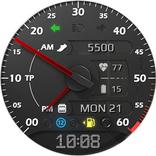
Realistic and easy to read retro-like style watch face
Realistic and easy to read retro-like style watch face for Wear OS with steps and beautiful night modes and animations.
NOTE: Please read the how to section and installation section !!!
ⓘ Features:
- Animated
- Steps
- Auto 12h/24h mode.
- Night modes
- Time and date
- Realistic design
- Battery indicator
ⓘ How to:
- To switch colors, double tap on the screen.
- Long press on the screen to customize hands color
Want another SUPER REALISTIC watch face? Here you go:
https://play.google.com/store/apps/details?id=wb.luna.benedicta
ⓘ Installation
How to install: https://watchbase.store/static/ai/
After installation: https://watchbase.store/static/ai/ai.html
If you have any issues installing the watch face, please note that we have no control over the installation process or any other Google Play / Watch processes. The most common issue that people face is after they buy the watch face and install it, they can't see/find it.
In order to apply the watch face after you install it, touch and hold on the main screen (your current watch face) the swipe left to look for it. If you can't see it, tap on the " + " sign at the end (add a watch face) and find our watch face there.
We use a companion app for the phone to make the installation process easier. If you buy our watch face, tap on the install button (on the phone app) you must check your watch.. a screen will appear with the watch face.. tap install again and wait for the installation to finish. If you already bought the watch face and it still asks you to buy it again on the watch, don't worry you will not be charged twice. This is a common synchronization issue, just wait a little or try to restart your watch.
Another solution for installing the watch face is to try to install it from a browser, logged with your account (google play account that you use on the watch).



One-click to install XAPK/APK files on Android!
Thanks for your rating and feedback!
You have already rated.