在APKPure安全快速地下載APK
APKPure 使用簽章驗證功能,確保為您提供無病毒的 PDF APK 下載。

閱讀、圖像轉換、照片轉PDF、文本、二維碼、Excel轉PDF等。
PDF - Free, Professional and Universal Application.
Get a professional app, with high quality features, Absolutely Free.
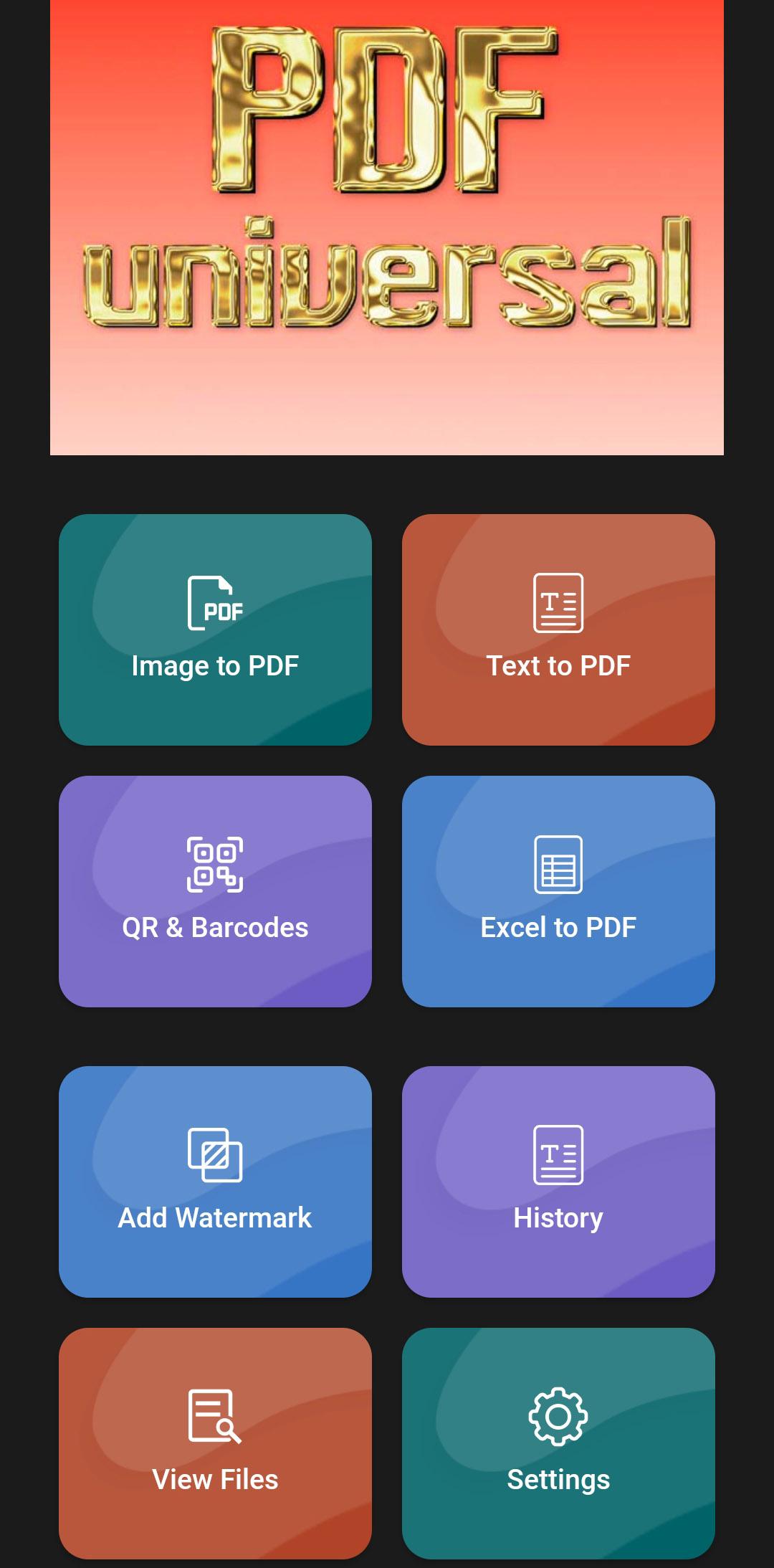
PDF has such functions as: PDF Format, photo, pdf reader for android, in Russian free, convert any image to PDF format, Create text to PDF, Scanner QR code and convert to PDF, Scanner Barcode and convert to PDF, Excel to PDF, add a watermark and more, all for free. The application is very powerful and convenient.
Work with documents offline and online. Download PDF - universal converter, editor and PDF reader. View PDF files on any mobile device with the best free PDF editor. With the application, you can view, comment, add an electronic signature, add a watermark, grant access, read documents in PDF format, compress PDF files.
Our advantage is that no app subscription is required, the PDF editor is completely free. Edit text and images in PDF files, use the PDF reader function, merge and organize, scan QR and Barcodes, create PDF.
VIEW AND PRINT
• Open and view PDF documents in a free PDF editor.
• Save battery life by turning on the app's dark mode.
• Choose between infinite scrolling, or PDF paging.
• Print PDF documents from any device.
EDITING
• Edit text and images directly in PDF files.
• Fix typos or add paragraphs with a paid feature.
• Delete, Add, rotate images in PDF editor.
ELECTRONIC SIGNATURE OF FORMS, FILLING OUT
• Add an electronic signature with a stylus or your finger.
• Fill out PDF forms.
• Add a watermark to PDF documents.
ADDING COMMENTS
• Add text and pictures to PDF files.
• Add color highlighting to PDF entries.
• Provide access to PDF files for comments.
FILE STORAGE AND MANAGEMENT
• Add documents to favorites for quick access.
• Access files such as Microsoft OneDrive, Dropbox.
WORKING WITH SCANS
• Access to PDF files created with the free PDF application.
• Open PDF scans to add an electronic signature, complete, comment or share them.
IN OUR FREE APP
Even more free features that operate in the PDF application.
• Edit PDF text and images directly in PDF (on any mobile device).
• Combine files and organize pages.
• Use the PDF converter function and create files from documents and images.
• Export PDF files to Microsoft Word, Excel and PowerPoint to PDF.
• Reduce the size of PDF documents with the ability to compress the PDF file.
• Set PDF passwords to protect your PDF files.
The mobile PDF document editor is designed for various devices.
Information PDF form.
Terms and conditions. The use of the application is governed by the general terms of use and the PDF privacy policy
The PDF application is the best solution to create, edit and compress a PDF form file on any mobile device, wherever you are. View, fill, annotate, e-sign and share PDF files. Convert JPG files to PDF, create and sign your PDF documents and PDF forms. Working with PDF files has never been so easy!



感謝您的評分和反饋!
您已經評分了。