Scan Date:Oct 31, 2026
Show More


10.0
2 Reviews
27.4 MB
File Size
Everyone
Android 8.0+
Android OS
Tailscale is a secure mesh VPN for connecting private devices across different networks.
Developed by Tailscale Inc., it uses identity-based access instead of exposing services directly to the internet. It suits remote work, home servers, cloud workloads, and private internal tools. Users who download Tailscale can link supported devices without rebuilding their existing network. Its main functions include:
Encrypted peer-to-peer connections built on WireGuard VPN technology
Private access controls for users, groups, devices, and tags
Cross-platform connections across phones, computers, servers, and cloud systems
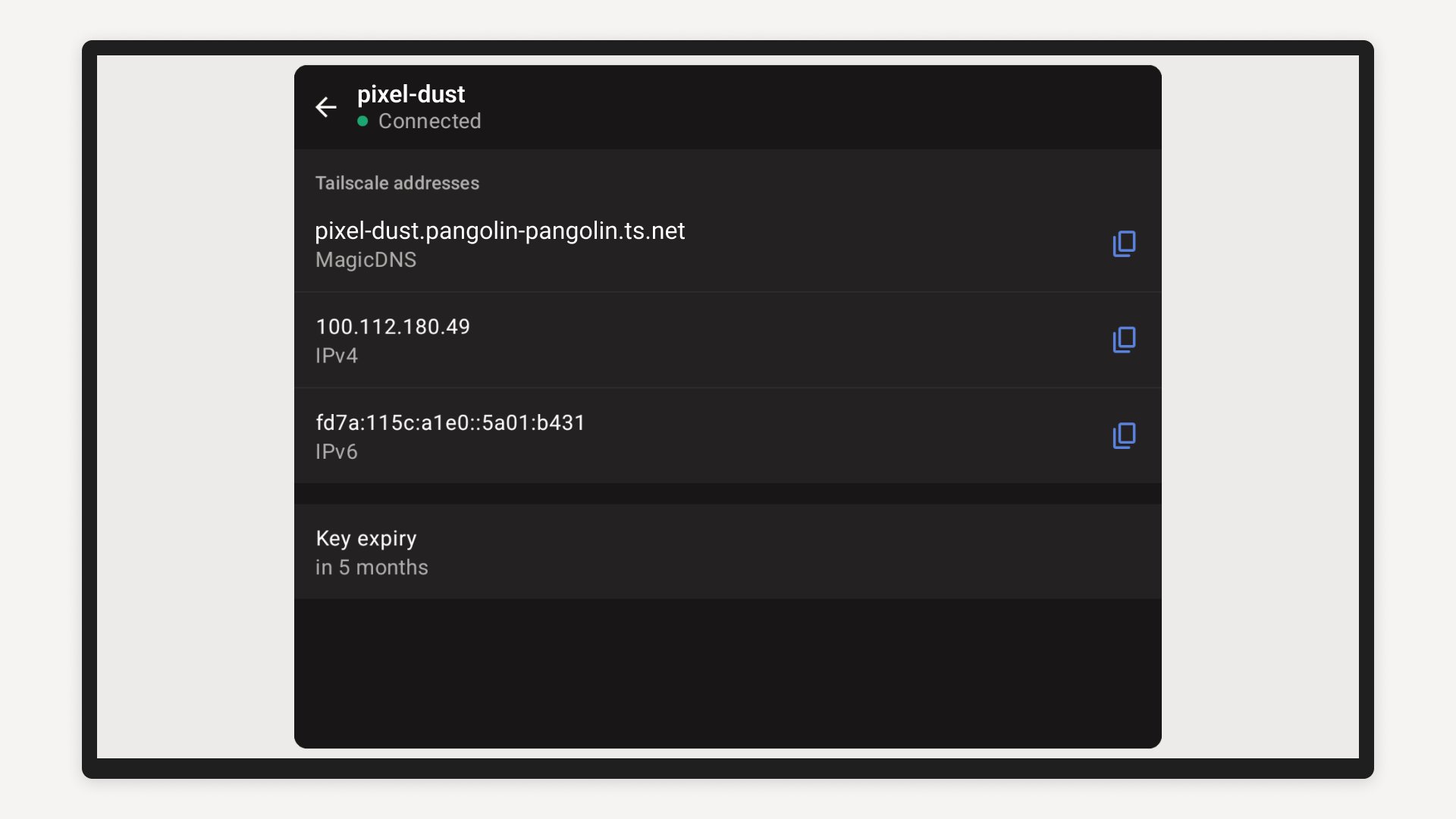
Device lists with stable private Tailscale IP addresses
Tailscale creates encrypted links between devices that belong to the same private network, often called a tailnet. It is built on WireGuard VPN technology, so a phone can securely reach a home computer, office server, or cloud machine even when each device uses a different internet connection. This is useful for accessing a private dashboard while travelling or checking a home lab without opening ports on a router.
The mesh VPN design avoids relying on one central VPN gateway for every connection. Devices can communicate directly when network conditions allow, which also reduces the single-point failure concerns found in more traditional setups. Connections remain private because services do not need to be publicly exposed just to be reached remotely.
Tailscale uses identities and policies to decide which people and devices can access private resources. Instead of granting broad access based only on an IP address or network location, permissions can be organized around users, groups, device tags, and individual machines. This Zero Trust approach is practical when personal devices, office computers, and cloud workloads need different access levels.
On Android, the device list shows other available machines and their stable Tailscale IP addresses. You can use a device name or that address in a browser, SSH client, or remote desktop tool to reach an allowed resource. More detailed policy management is normally handled through the web-based administration console, so the mobile app stays focused on connection status and access.
Tailscale gives Android users a clear way to join an existing tailnet and check whether the private connection is active. After selecting “Get Started,” the main screen displays the current VPN or network status, while the connection switch lets you turn the Android connection on or off. This makes it easy to confirm that private services are reachable before opening another app to use them.
For example, a user can connect before opening a browser to manage a NAS, then disconnect after finishing. If an organization has configured subnet routers or exit nodes, related routing choices may appear in the app. These options can extend access to devices such as printers, servers, and storage units that cannot run the client themselves.
Tailscale supports Android alongside iOS, Windows, macOS, Linux, and tvOS, allowing a single private network to cover many device types. That flexibility fits homes with several operating systems as well as teams working between offices and cloud environments. It can also support infrastructure uses involving Kubernetes, CI/CD systems, edge devices, and protected AI services.
No switch replacement or major network redesign is required for the basic overlay network. A user can add devices gradually, which is helpful when a home lab or small team is growing over time. Some advanced situations still depend on external setup, particularly subnet routing, exit nodes, and larger enterprise workload connections.
Tailscale is strongest when private devices need secure access across separate locations without complicated port forwarding. Its limits mainly appear when a tailnet and advanced network routes have not already been configured.
Pros
Encrypted private networking based on WireGuard VPN
No router port forwarding for normal remote access
Supports major desktop, mobile, and server platforms
Stable device names and private IP addresses
Identity-based permissions suit shared work environments
Cons
Requires an existing tailnet and access policies
Advanced routing needs separate network-side configuration
Complex policy editing is mainly handled in a web console
You can download the latest Tailscale APK from APKPure when you need secure access to an existing private network. The download is around 30MB, so it should complete quickly on a normal connection, although installation time can vary by device. Check that enough free storage is available and allow the installation to finish before opening the app.
After installation, sign in through “Get Started” and confirm that the connection status becomes active. Choosing the Tailscale latest version helps ensure compatibility with the other devices in a tailnet. If private resources do not appear, the account or organization may need additional access permissions or route settings.



One-click to install XAPK/APK files on Android!

Thanks for your rating and feedback!
You have already rated.