
Safe & Fast APK Downloads on APKPure
APKPure uses signature verification to ensure virus-free Soccer Stats w/ Timer APK downloads for you.

Easy Soccer Stats and Player Playing Time Management.
This soccer stats application will track the following stats on up to 25 players per team:
Goals, Assists, Shots on Goal (SOG), Shots, Fouls, Cards, Corner Kicks (CK) and Saves. 6 customizable buttons for defining your own stats.
- Perfect for Coaches or Parents.
- Supports viewing a teams's Season results quickly within the APP.
- Display Player names under Player Icons.
- Ability to produce MaxPreps file for uploading to the site.
- Ability to import/export Team Roster files.
**Set Portrait or Landscape display mode in the Preferences
- Ability to rename buttons CKs, Saves, C1, C2 and C3
- ability to automatically Tweet Game Events via Twitter (see below for setup)
Long Click on Player ICONs to sub IN/OUT quickly. See all 11 players on the screen for quick/easy awarding of stats.
It will also track the amount of time a player plays in the game.
All player's stats can be viewed by clicking the menu button and selecting VIEW STATS.
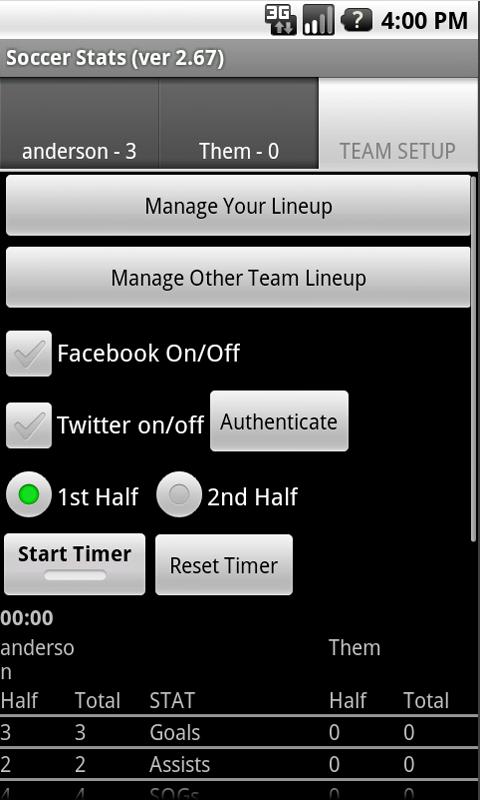
Team Stats are displayed by Half/Total on the Team Setup Tab and are included in email body.
You can email the player's stats to anyone as a CSV or HTML attachment.
You can save the Game Results locally for loading / viewing / emailing at a later time.
Stats are auto-saved if you leave the game accidentally by hitting the return key and they are reloaded when you re-enter the App.
For Twitter (Version 2.2+ of Android required):
- 1st Authenticate the Application to use Twitter
- Twitter browser will display for you to login and approve
- Twitter redirects back to APP after approval
- Authenticate button will disappear
- Check on the Twitter Checkbox
- From MENU - See Twitter Settings to select Game Events to Tweet. Goals and Game Notes are on by default
- Return from Twitter Settings by using the RETURN ARROW on your phone.
- Take stats as normal and selected Game Events will be posted to Twitter.
- Settings are automatically saved for next use of App
======= Other recent changes ========
ver 2.74 - Add team names to Start of Match notification
ver 2.73 - German translations corrections; Post starting lineup to Facebook; Correct issue on manage line-up page with clearing line-up.
ver 2.72 - corrects reporting error in MaxPreps file
ver 2.71 - Correct issue with Stats not moving correctly when sorting players
ver 2.70 - Preference screen changes; Undo Button Color change implemented
ver 2.66 - Post players In to Game Events only, incorrectly pushing to Twitter.
ver 2.64 - Display "Players In" at the start of the game in the Game Events log.
ver 2.63 - Adds ability to change button colors to list of predefined colors via settings
ver 2.62 - Adds ability to capture a score on own goal




One-click to install XAPK/APK files on Android!

Thanks for your rating and feedback!
You have already rated.






