
Safe & Fast APK Downloads on APKPure
APKPure uses signature verification to ensure virus-free Roland SPD 20 X APK downloads for you.

Roland SPD 20 X is a mobile Octapad-style drum pad simulator for percussion practice.
Developed by Mobile octopad, it focuses on quick, portable finger-drumming on a touchscreen. The app centers on eight responsive pads for triggering drum machine sounds and a simple Patch Load function for swapping kits. It suits fast practice, sound demos, and small backup parts when a hardware pad is not around. Users who download Roland SPD 20 X can test kits in minutes without setup. Below are the core highlights that matter in everyday use.
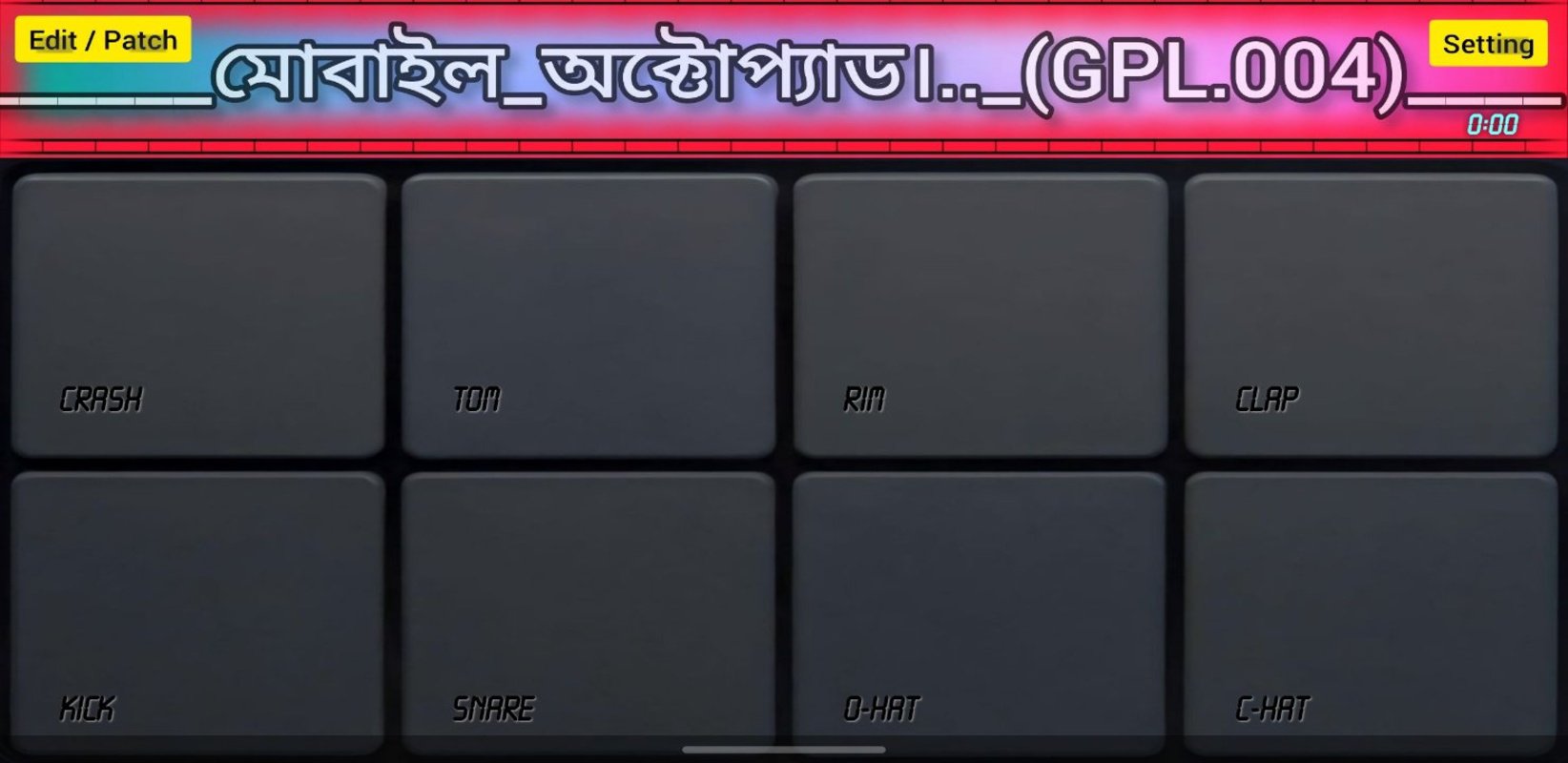
The main screen presents an eight-pad grid, each pad mapped to a percussion or drum machine sound. Single taps produce precise hits, and quick repeated taps let you build rolls and accents. Multi-touch support means you can trigger several pads at once, so layered claps, snare ghosts, or tom runs feel natural when both hands are on the screen.
In quick practice sessions, the feel is immediate. Volume balancing matters on phones, so many players keep a comfortable output level to hear ghost notes clearly. Device audio latency varies by hardware and background load, which is common for mobile music tools. Closing other heavy apps and using stable audio output helps keep timing tight without turning the experience into a setup task.
Patch Load is the shortcut to changing your sound palette. You can switch between preset kits and user-imported patches so a dry studio rock kit, an EDM set with tight kicks, or a percussion mix for world grooves are one tap away. After selection, the new kit is ready immediately, which is practical for auditions, short demos, or lesson segments.
The Roland SPD 20 X app does not try to mirror every deep parameter found on dedicated hardware. Its Patch Load system focuses on fast, usable swaps rather than deep editing. For broader variety, many users collect community-made kits shared through app pages and video descriptions, then return to a few reliable sets for rehearsals and workshops.
This app fits common practice routines where speed matters more than features. You can compare patches for volume, tone, and perceived delay in a few taps, which helps pick a kit that cuts through phone speakers or simple rehearsals with a small speaker. It also works for warm-ups before band practice or teaching segments when you need a quick example rhythm without a full rig.
Expect a focused tool rather than a full production station. It is not an official Roland product and does not include the in-depth editing found on SPD-20X hardware or a DAW. The practical approach is to keep a compact library of trusted patches, learn pad positions by feel, and use short, repeatable exercises to build consistency. Community videos provide useful starting points for new players who want to refine sticking and timing.
Installation is small and the app runs on a wide range of Android devices, including older phones. This light footprint helps when storage is tight or you just need a dependable backup drum pad that opens quickly. It is especially helpful for educators and gigging musicians who rotate through devices or prefer keeping a dedicated practice phone in their bag.
The Roland SPD 20 X app favors stability and quick access over complex menus, so it is easy to hand to a beginner or use for a fast demo between songs. Documentation can be limited, and update cadence is not always predictable. When in doubt, keep your favorite patches backed up and lean on widely shared tutorials for tips and kit ideas.
You can get the Roland SPD 20 X APK on APKPure. The download usually completes in under a minute on a stable connection. File size may vary by release, so ensure sufficient storage before downloading. After the file finishes, Android may ask for confirmation to install apps from your browser or file manager.
Open the app and try the default kit first, then explore Patch Load to find a set that fits your practice. For the best experience, keep your device volume balanced and test with headphones or a small speaker. If you want the Roland SPD 20 X latest version later, return to APKPure to update and continue building your go-to kits.



One-click to install XAPK/APK files on Android!

Thanks for your rating and feedback!
You have already rated.






