










Thanks for your rating and feedback!
You have already rated.

Enjoy amazing and secure locker for your device with beautiful wallpapers
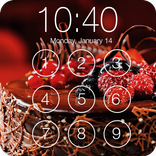
Passcode Screen Lock lets you customize your phone's lock screen with a four-digit passcode and a selection of wallpapers. Set your own passcode, choose a background you like, and use a different lock screen style on your device.
The lock screen also displays the date and time, along with notifications, so you can check important information without unlocking your phone.
Passcode Lock
Set a personal four-digit passcode to unlock your phone. When the lock screen appears, swipe and enter your passcode to continue. Make sure you remember your passcode for future use.
Lock Screen Wallpapers
Choose from the available wallpapers and give your lock screen a different appearance. You can change the background through the app settings whenever you want.
Date & Time
Check the date and time directly on your lock screen. You can also use the 24-hour time format according to your preference.
Notifications & Calls
View supported notifications on the lock screen. You can also attend or reject incoming calls without leaving the lock screen.
Other Features
Simple passcode setup.
Customizable lock screen wallpapers.
Date and time display.
Offline access to the app and wallpaper gallery.
How to Get Started
Open the app and allow the required permissions.
Enable the lock screen from the settings.
Set your four-digit passcode.
Choose a wallpaper from the available collection.
Your lock screen is ready to use.
Important Usage Information
For the intended lock screen experience, you may need to disable your phone's default lock screen. You can access your device's security settings through the app settings.
Device settings may vary depending on your Android version and manufacturer.
Feedback & Support
If you have suggestions or experience any problems, feel free to contact us by email. Your feedback helps us improve the app.
Thank you for using Passcode Screen Lock!



One-click to install XAPK/APK files on Android!
Thanks for your rating and feedback!
You have already rated.