












Thanks for your rating and feedback!
You have already rated.

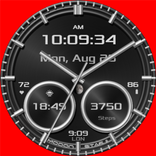
Cosmos Analog and Digital Editable Watch Face for Wear Os
Existing Features:
- Date stamp displaying the day of the week
- Underneath it is a bar that indicates the battery charge status.
- On the right side an analogue clock with a digital date and a digital clock.
- The watch face includes the Always-On feature with green backlight when activated in the watch settings.
- About 9, 11, 12 and 1 hours click to open any application (as shown in picture).
- Time available 12/24h.
(Note: If Google Play says "Incompatible Device", open the link in the web search engine on your computer or mobile phone and install the watch face from there.)
Personalization:
- Wallpaper changes - photos can be made by touching the screen.
- The logo can be changed or made invisible by pressing on it.
-After a long press on the dial and entering the option, you can choose the colors (1z30) of the date stamp, battery charge status and clocks.
Privacy policy:
Our application does not collect, use or share any personal data. If you have additional questions, please contact me at the following e-mail address: visiontimewatch@gmail.com
Photos downloaded and modified for our needs from "NASA".
Have fun ;)



One-click to install XAPK/APK files on Android!
Thanks for your rating and feedback!
You have already rated.