Minimal Clock Widget

Minimal Clock Widget

Tom Swartz
Oct 9, 2015
  • 87.0 KB

    File Size

  • Everyone

  • Android 1.6+

    Android OS

About Minimal Clock Widget

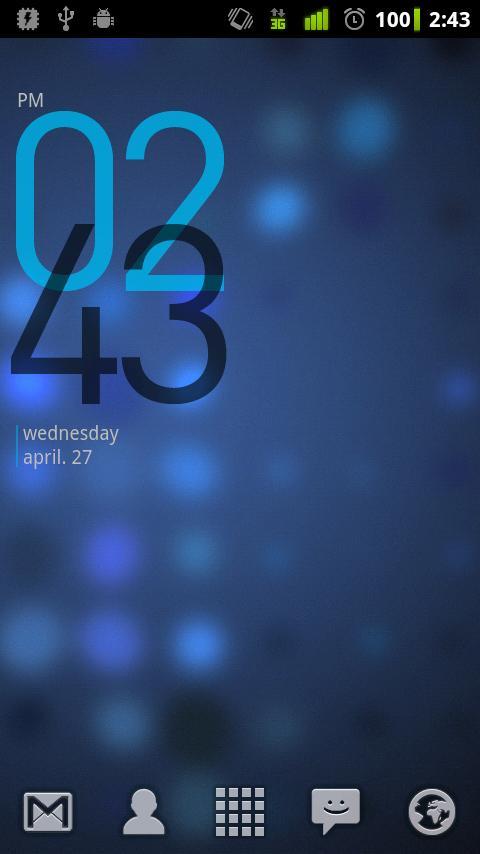
Minimalistic Clock is a beautifully styled widget for your homescreen.

This is a little widget that displays a very minimalistic clock on your homescreen.

To add it to your homescreen select menu>add>widgets and then you will be prompted to customize the time display options!

If you like this application, feel free to donate a few dollars to my cause: http://www.tswartz.net/android-applications.html

If you have any questions or concerns, please do not include them in the review, as I cannot respond to them- instead, please email me using the link provided on the Store Page. Thanks!

Please be aware that I needed to remove the color picker, as it was causing the app to crash. I hope to return this feature sometime soon. Volunteers are welcome!

Show More

What's new in the latest 1.5

Last updated on 2015-10-09
Version 1.5 - Android 4.2 support! Add this as a lockscreen widget. Please note that Lockscreen Widgets will only work for Android 4.2 devices and above.

Version 1.4 - Added initial support for Android 4.0+ devices. The widget now has a 'sample image' from the widget picker, and the theme now uses the Android system default.
Show More

Videos and Screenshots

  • Minimal Clock Widget poster
  • Minimal Clock Widget screenshot 1
  • Minimal Clock Widget screenshot 2

Minimal Clock Widget APK Information

Latest Version
1.5
Android OS
Android 1.6+
File Size
87.0 KB
Developer
Tom Swartz
Content Rating
Everyone
Safe & Fast APK Downloads on APKPure
APKPure uses signature verification to ensure virus-free Minimal Clock Widget APK downloads for you.

Old Versions of Minimal Clock Widget

APKPure icon

Super Fast and Safe Downloading via APKPure App

One-click to install XAPK/APK files on Android!

Download APKPure
thank icon
We use cookies and other technologies on this website to enhance your user experience.
By clicking any link on this page you are giving your consent to our Privacy Policy and Cookies Policy.
Learn More about Policies