Scan Date:Jun 27, 2024
Show More

1.1 MB
File Size
Everyone
Android 4.3+
Android OS
Bluetooth Terminal for micro:bit devices
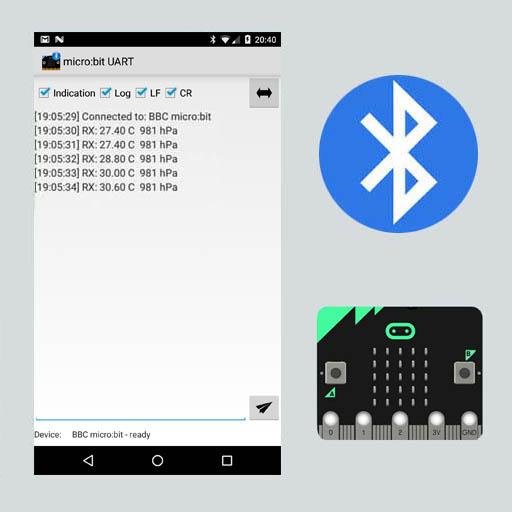
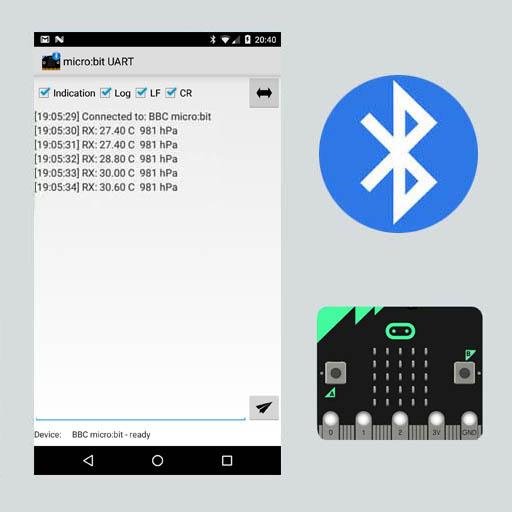
This app communicates between Android and a micro:bit device. You can transmit and receive text in 'notification' or 'indication' mode. The UART communication also has to be implemented at the micro:bit device (Block, Javascript, MBED).
Options:
- Indication: Default micro:bit mode (otherwise notification mode)
- LF: Linefeed added
- CR: Carriage return added
Requirements:
- Min. Android 5
- Bluetooth Low Energy (BLE)
- Paired devices
- micro:bit programm (developed by yourself)
V 2.1: Copy to Clipboard (Option Menu)
V 2.2: Clear List (Option Menu), No Log Option
V 2.5: Hex Mode
MBED example:
#include "MicroBit.h"
#include "MicroBitUARTService.h"
#include "BMP180.h"
MicroBit uBit;
MicroBitUARTService *uart;
BMP180 bmp180(P0_30, P0_0);
char buffer[80];
float pressure,temperature;
int connected = 0;
void onConnected(MicroBitEvent e)
{
uBit.display.scroll("C");
connected = 1;
}
void onDisconnected(MicroBitEvent e)
{
uBit.display.scroll("D");
connected = 0;
}
void onButtonA(MicroBitEvent e)
{
uBit.display.scroll(buffer);
}
void onButtonB(MicroBitEvent e)
{
uBit.display.scroll("SK");
}
/*
IMPORTANT !!!
Oherwise you will run out of memory !
Recommend disabling the DFU and Event services in MicroBitConfig.h since they are not needed here:
microbit->microbit-dal->inc->core->MicroBitConfig.h
#define MICROBIT_BLE_DFU_SERVICE 0
#define MICROBIT_BLE_EVENT_SERVICE 0
#define MICROBIT_SD_GATT_TABLE_SIZE 0x500
*/
int main()
{
bmp180.Initialize(64, BMP180_OSS_ULTRA_LOW_POWER);
pressure = -1;
temperature = -1;
if (bmp180.ReadData(&temperature,&pressure))
sprintf(buffer, "%.2f C %4.0f hPa", temperature, pressure);
else
sprintf(buffer,"NOK");
// Initialise the micro:bit runtime.
uBit.init();
uBit.messageBus.listen(MICROBIT_ID_BLE, MICROBIT_BLE_EVT_CONNECTED, onConnected);
uBit.messageBus.listen(MICROBIT_ID_BLE, MICROBIT_BLE_EVT_DISCONNECTED, onDisconnected);
uBit.messageBus.listen(MICROBIT_ID_BUTTON_A, MICROBIT_BUTTON_EVT_CLICK, onButtonA);
uBit.messageBus.listen(MICROBIT_ID_BUTTON_B, MICROBIT_BUTTON_EVT_CLICK, onButtonB);
uart = new MicroBitUARTService(*uBit.ble, 32, 32);
uBit.display.scroll(":)");
while(1)
{
pressure = -1;
temperature = -1;
if (bmp180.ReadData(&temperature,&pressure))
sprintf(buffer, "%.2f C %4.0f hPa", temperature, pressure);
else
sprintf(buffer,"NOK");
if (!connected) {
uBit.sleep(500);
}
else
{
uart->send(buffer);
uBit.sleep(1000);
}
}
release_fiber();
}



One-click to install XAPK/APK files on Android!

Thanks for your rating and feedback!
You have already rated.












