APKPure에서 안전하고 빠른 APK 다운로드
APKPure는 바이러스 없는 Remote Speed Dial APK 다운로드를 위해 서명 확인을 사용합니다.

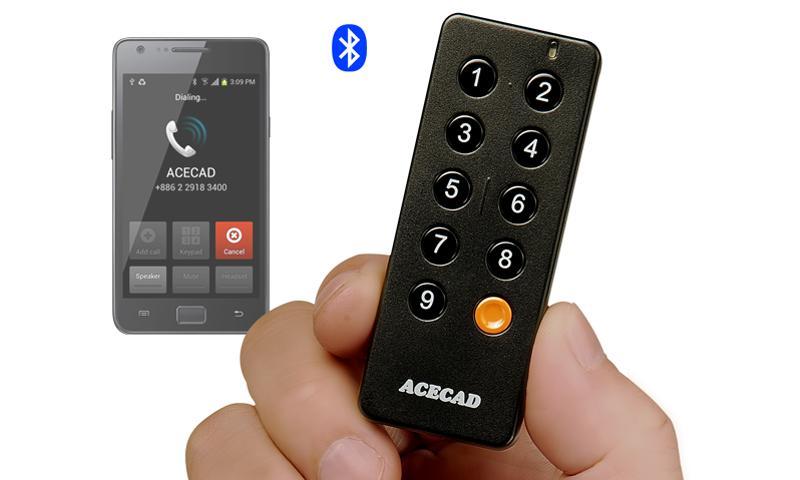
ACECAD AceDialer SD1 - The Bluetooth Speed Dial Controller.
This App can be used alone for speed dial by operating your phone. It is perfect to use this App with ACECAD AceDialer SD1 - Bluetooth Speed Dial Controller for quickly and safely making, answering or ending calls without having to touching your phone.
Press a button on the AceDialer SD1 - Bluetooth Speed Dial Controller to make a call to a speed contact, or press any button to end or answer a call without touching your phone. Perfect when driving! Keep it in your car to make, answer or end hands-free calls safely.
★ Using this App for the AceDialer SD1 Controller
1. You can easily set a speed contact for each button (1~9) and the emergency button from your Contacts.
2. The speakerphone of your phone can be set to be automatically activated.
3. The button 9 can be set to find your phone within 10 meters by an audio alert.
*** Don't have an ACECAD AceDialer SD1 - Bluetooth Speed Dial Controller? You can still use this App easily to set the speed contacts and call a speed contact by operating your phone.
★ Using the AceDialer SD1 Controller
1. Press one speed dial button (1~9) to call a speed contact without touching your phone.
2. Press any button to end or answer a call without touching your phone.
3. Press the emergency button to make a call and send a text message with your approximate location to your emergency contacts.
This button is very helpful in an emergency situation such as a sudden dangerous event, a natural disaster or a crisis, without having to touch your phone.
4. Works with a wired / Bluetooth headset or Bluetooth hands-free unit in a vehicle.
★ Features and Specifications of the AceDialer SD1 Controller
1. One phone can work with several AceDialer SD1 Controllers with the same setting.
2. The ultra-thin, compact, portable and handy controller weighs only 0.53 oz. (15g) including strap holder.
Size: 70mm (L) x 28mm (W) x 8mm (T) ; 2.76" (L) x 1.1" (W) x 0.31" (T)
3. Power-saving only requiring one button cell battery (CR2032) that will last over a year (up to 5,000 calls).
For more information, please visit our website:
http://www.acecad.com.tw






등급과 피드백에 감사드립니다!
당신은 이미 평가했습니다.