APKPure에서 안전하고 빠른 APK 다운로드
APKPure는 바이러스 없는 Micro Keyboard APK 다운로드를 위해 서명 확인을 사용합니다.

A simple keyboard with big keys for small phones and Android OS smartwatches.
Micro Keyboard (MKB) is a simple app for people who want an easy-to-learn keyboard with big keys. It was made for small or old phones, certain Android OS smartwatches (not Android Wear watches) & people with bad eyes or big thumbs. Don't install it if you want autocompletion or other extra features.
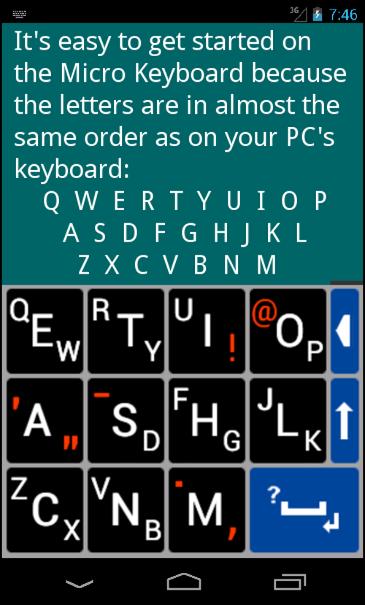
MKB puts all the letters in the familiar qwerty order, but it has just 11 big letter keys. Each key tells you how to type its characters:
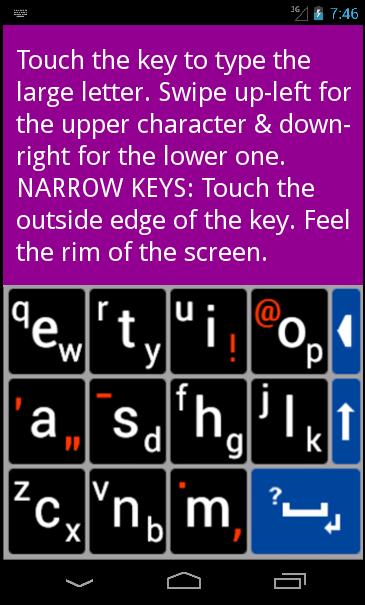
• To type the large character, touch the key.
• To type the upper character, swipe up-left.
• To type the lower character, swipe down-right.
It's easier to touch than to swipe, so the designer took the letter frequency of the English alphabet into account when deciding which letters you type by touching & which you swipe. 10 of the 11 most-used letters became touch letters. So you touch 75% of the time & swipe only 25%.
Some of the coding of this app is based on the SlideType Keyboard by Alejandro Grijalba (in the Play Store). MKB uses the QwertyX Keyboard Design (copyright © 2011 by Ernest Ruckle).
Attention Developers
Would you like to use the QwertyX KB Design in your own KB app for visually impaired / low vision users? It's free for free apps. Contact us.
Safety
There is no safer app than MKB. The warning you'll see when activating MKB is the same for all keyboard apps. Only autocompletion keyboards collect your personal information.
U S E R - G U I D E
To Activate (Please read carefully)
• OLDER PHONES: Phone Settings/Locale & text, Language & keyboard, or Language & input. Check Micro KB. Long-touch in text-box or pull down Notifications, choose Input Method, & check Micro KB.
• ANDROID 4: Phone Settings/Language & input/Default/Set up input methods.
• ANDROID 5 & 6: Phone Settings/Language & Input/Current keyboard/Choose keyboards.
Get Started
Put your phone with MKB showing next to your PC keyboard. Compare the 3 lines of letters. Notice the location of these characters: !@' "-.,?.
How to Swipe
To type a J, put your thumb on the middle of the JLK key & immediately move it past the top-left of the key. Lift your thumb when you've moved it about the height of the key. Swipe down-right for the K. A short, quick swipe is best.
Narrow Keys
The SHIFT & DELETE keys are very narrow & are meant to be touched in a different way. Don't aim for the center of the key. Aim for the outside edge, feel the rim of the device. These narrow "rim keys" are an experimental feature. Please email us about how they work on your device. (Mention your screen size.)
Special Keys
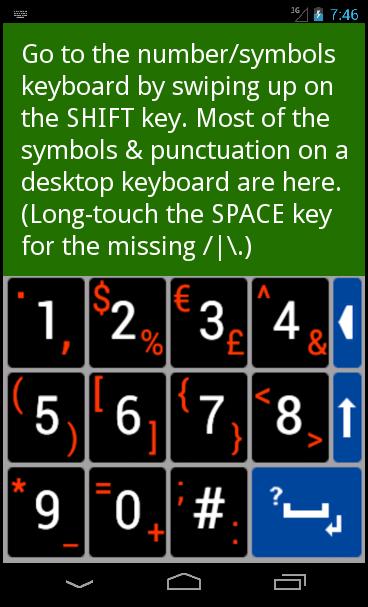
• SHIFT KEY - Touch to toggle shift mode. Swipe up for the number/symbols keyboard. Swipe down to toggle caps-lock.
• SPACE KEY - Touch for a space. Swipe up-left for a question mark. Swipe down-right for enter/return or to signal you're done. Long-touch for more punctuation marks.
• DELETE KEY - The only key that repeats if you hold it down.
Pop-Up Characters
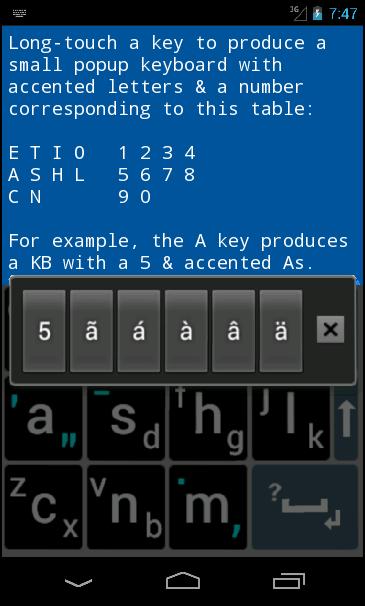
When you long-touch most of the keys, a small pop-up keyboard will appear. Most keyboards have a number followed by accented letters for Spanish, Portuguese, German, French & Italian. For example, the E key's popup characters are 1éêèë. The UI! Key was too crowded with accented I's, so the accented U's are on the RTY key. The N, M & SPACE keys have symbols & punctuation marks. To exit a pop-up keyboard, touch the small x key or press your phone's BACK button.
Exit the Keyboard
Press your phone's BACK button.
Main Menu
To get to the Main Menu (Help, Settings, About), go to your phone's Apps drawer & touch the MKB icon.
More Help
See the screenshots for some tips & http://www.qwertyxkeyboard.com/mkb.htm

등급과 피드백에 감사드립니다!
당신은 이미 평가했습니다.