
APKPure에서 안전하고 빠른 APK 다운로드
APKPure는 바이러스 없는 Learn MS Excel Complete Guide (OFFLINE) APK 다운로드를 위해 서명 확인을 사용합니다.

MS 엑셀에서 작동하는 데 문제가.?여기에 전체 MS 엑셀 안내입니다
Microsoft Excel is a commercial spreadsheet application, written and distributed by Microsoft for Microsoft Windows and Mac OS X. At the time of writing this tutorial the Microsoft excel version was 2010 for Microsoft Windows and 2011 for Mac OS X.
Microsoft Excel is a spreadsheet tool capable of performing calculations, analyzing data and integrating information from different programs.
By default, documents saved in Excel 2010 are saved with the .xlsx extension whereas the file extension of the prior Excel versions are .xls.
Audience
This tutorial has been designed for computer users who would like to learn Microsoft Excel in easy and simple steps. It will be highly useful for those learners who do not have prior exposure to Microsoft applications.
Prerequisites
Before proceeding with this tutorial, you should have a basic understanding of Computer peripherals like mouse, keyboard, monitor, screen etc. and their basic operations. You should also have the basic skills of file management and folder navigations.
Microsoft Excel is a very versatile tool and can be used for almost anything that you can imagine:
Agendas
Budgets
Calendars
Cards
Charts and Diagrams
Financial Tools (Loan calculators etc.)
Flyers
Forms
Inventories
Invoices
Lists and to-do checklists
Planners
Plans and proposals
Reports
Schedules
Timesheets
We combine a complete step by step guide to learn Microsoft Excel.
From Formulas to Setting Margins
From Setting Dependencies to Basic Operations in Excel
Chapters Included are :
MS Excel Basics
Excel - Getting Started
Excel - Explore Window
Excel - Backstage
Excel - Entering Values
Excel - Move Around
Excel - Save Workbook
Excel - Create Worksheet
Excel - Copy Worksheet
Excel - Hiding Worksheet
Excel - Delete Worksheet
Excel - Close Workbook
Excel - Open Workbook
Excel - Context Help
Editing Worksheet
Excel - Insert Data
Excel - Select Data
Excel - Delete Data
Excel - Move Data
Excel - Rows & Columns
Excel - Copy & Paste
Excel - Find & Replace
Excel - Spell Check
Excel - Zoom In-Out
Excel - Special Symbols
Excel - Insert Comments
Excel - Add Text Box
Excel - Undo Changes
Formatting Cells
Excel - Setting Cell Type
Excel - Setting Fonts
Excel - Text Decoration
Excel - Rotate Cells
Excel - Setting Colors
Excel - Text Alignments
Excel - Merge & Wrap
Excel - Borders and Shades
Excel - Apply Formatting
Formatting Worksheets
Excel - Sheet Options
Excel - Adjust Margins
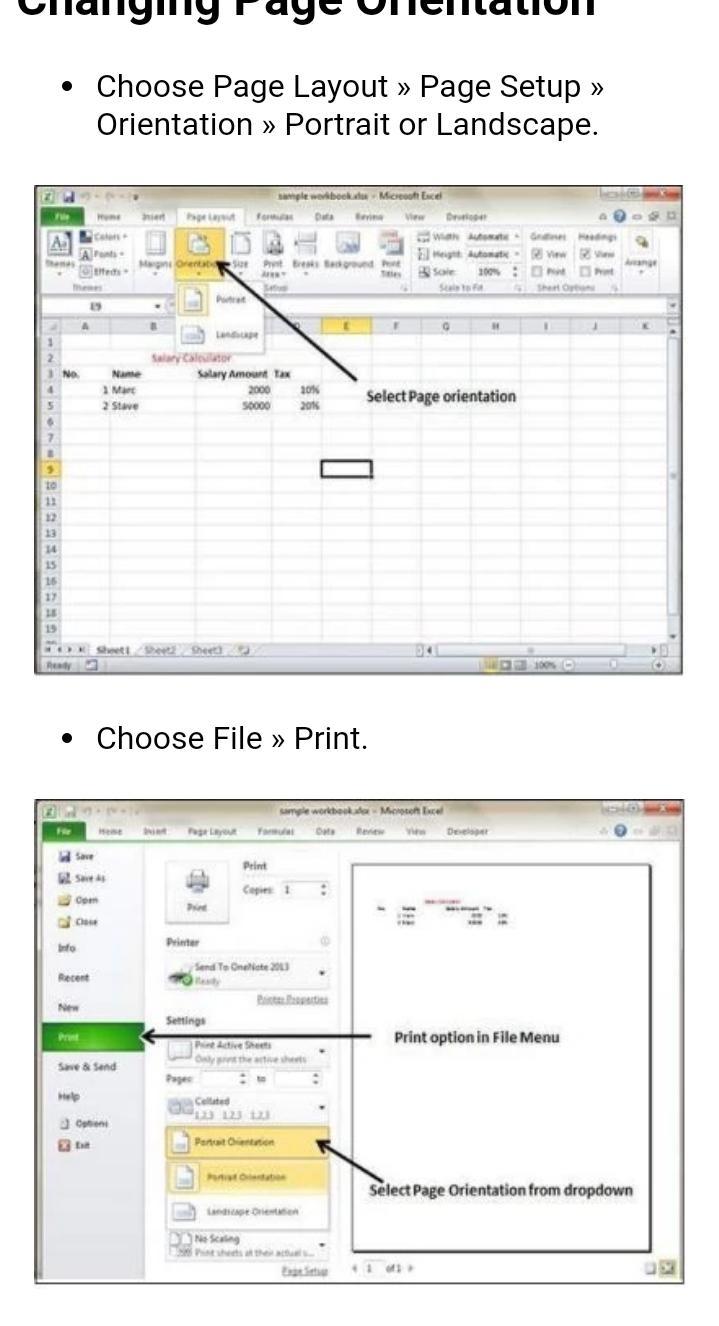
Excel - Page Orientation
Excel - Header and Footer
Excel - Insert Page Breaks
Excel - Set Background
Excel - Freeze Panes
Excel - Conditional Format
Working with Formula
Excel - Creating Formulas
Excel - Copying Formulas
Excel - Formula Reference
Excel - Using Functions
Excel - Bultin Functions
Advanced Operations
Excel - Data Filtering
Excel - Data Sorting
Excel - Using Ranges
Excel - Data Validation
Excel - Using Styles
Excel - Using Themes
Excel - Using Templates
Excel - Using Macros
Excel - Adding Graphics
Excel - Cross Referencing
Excel - Printing Worksheets
Excel - Email Workbooks
Excel- Translate Worksheet
Excel - Workbook Security
Excel - Data Tables
Excel - Pivot Tables
Excel - Simple Charts
Excel - Pivot Charts
Excel - Keyboard Shortcuts
This app has it all so Start Downloading..!



등급과 피드백에 감사드립니다!
당신은 이미 평가했습니다.






