Unduh APK dengan Aman dan Cepat di APKPure
APKPure menggunakan verifikasi tanda tangan untuk memastikan unduhan APK Codeanywhere - IDE, Code Editor, SSH, FTP, HTML yang bebas dari virus untuk Anda.


10.0
3 Ulasan
7.4 MB
Ukuran file
Everyone
Android 5.0+
Android OS
IDE - Kode Editor dengan SSH Terminal dan FTP Client untuk HTML dan PHP
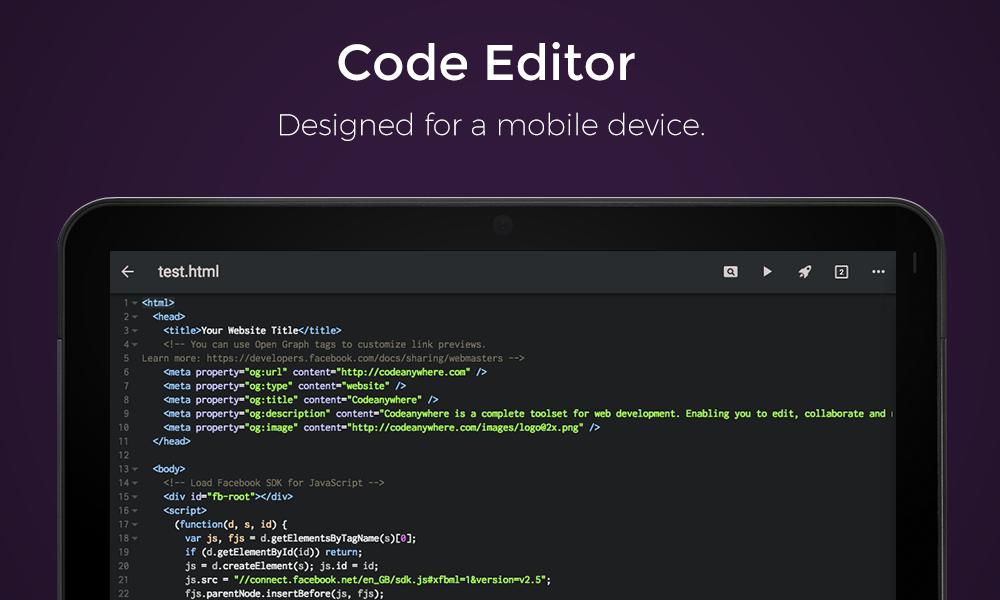
Codeanywhere is a fully featured Integrated Development Environment (IDE) for your Android device or Mobile IDE which includes a code editor (or text editor), FTP client and SSH terminal console, that has been redesigned and reengineered to be light, fast, and mobile-friendly.
You can think of it as a Sublime Text or VS Code on your Android. Enabling you to code HTML, PHP, CSS or any other of the more than 100 supported coding languages.
The Connection manager lets you connect to any type of server protocol including; FTP, FTPS (explicit, implicit over TLS), SFTP (Secure file transfer over SSH). Also you can connect to third party services like:
• Dropbox
• Google Drive
• OneDrive
• Amazon S3
• Github
• Bitbucket
If you don’t have your own server, Codeanywhere can spin up a Linux container for you, either based on CentOS or Ubuntu. You can use the standard default installations or pick from one of over 50 pre configured including:
• PHP
• HTML
• Ruby
• Wordpress
• Drupal
• Magento
• .NET
• and many more.
Once you are connected Codeanywhere offers you a (FTP) File browser, which enables you to upload, download, rename, delete, update permissions (chmod), run custom commands and more just with the swipe of your finger.
Codeanywhere automatically lets you connect to any supporting server with it’s terminal client for Android including SSH, Bash and Telnet support. Terminal client features include:
• Full colour ssh terminal client
• Extended keyboard
• External keyboard support
• Telnet support
• Copy & Paste to and from the SSH Client
• Multiple tabs enable multiple SSH sessions
On top of all that Codeanywhere enables you to share and collaborate on projects or just a single file - from wherever you are, and of course quickly edit code with our keyboard that has been customised for developers on the go.
Codeanywhere makes developers forget what device they are working on and let them concentrate on getting work done - be it from the phone, tablet, or the desktop.
Key Features:
• Syntax highlighting of more than 100 languages
• Autocomplete for HTML, XML, CSS, JavaScript, Python and PHP
• SSH Terminal Client
• FTP and SFTP Client
• Dropbox Client
• Google Drive Client
• OneDrive Client
• Amazon S3 Client
• GitHub Client
• Bitbucket Client
• Copy or Move files between FTP, SFTP or Dropbox
• Share ( Servers, folders or files with others )
• Cursor navigation for easy text selection
• Supports most encodings types
• Auto-indentation
• Customizable font sizes
• Undo & Redo
• Advanced Search ( includes Find , Replace, RegEx and Match Case )
Codeanywhere is also available on the desktop (via the web browser), iPhone and iPad.
Access it from anywhere at https://codeanywhere.com
Featured in TechCrunch, PandoDaily and TheNextWeb.
(Please note that this app requires the user to login to be able to synchronize your settings across all platforms.)



Sekali klik untuk menginstal file XAPK/APK di Android!

Terima kasih atas peringkat dan umpan balik Anda!
Anda sudah menilai.






