Scan Date:Feb 3, 2026
Show More

15.2 MB
File Size
Everyone
Android 7.0+
Android OS
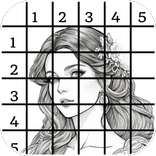
Create a drawing by dividing an image into small portions using GridArt Drawing.
GridArt drawing is a very helpful application for those who want to draw grid lines over your reference image. The grid drawing maker application offers different types of grid color and effects for your images. First of all, select your image and enter no of row and column then apply the diagonal. Here, you can also adjust the size of your image and brightness. After completing the process you can save your drawing by grid line images and share in different platform like Instagram, Whatsapp, etc.
Draw grids using the drawing grid maker. A grid is created out of the image, and the artist duplicates each grid segment on a matching grid on their drawing surface. Grid maker for drawing is technique is very helpful for realistic or difficult artwork since it maintains exact proportions and details.
Feature :
- You can apply different types effects on your selected image
- You can enter no of rows and Y-axis offset
- You can enter no of column and X-axis offset
- Increase or decrease the thickness of the grid lines
- Draw diagonal grids and apply your favorite color
- Apply the color in your grid lines
- Apply the label and here also you can select colors for label
- Lock or unlock your selected image in grid art
- Split your selected image
- You can crop and rotate your image
- Adjust brightness, contrast, saturation, hue in your image
- You can save your drawing grid maker images
- Draw with grid lines photos and share in different platform
Step to create a grid drawing:
1.Select your image:
First of all, select your image you want to draw. After that you can apply different types of effects on your selected image in the artistic grid application.
2.Divide the image into a grid:
Overlay the image with a grid of equally spaced horizontal and vertical lines. The size of the grid squares will depend on the size of your drawing surface and the level of detail in the image. The more detailed the image, the smaller the grid squares should be.
3. Draw the same grid on your drawing surface:
Transfer the grid onto your drawing surface. Ensure that the grid on your drawing surface has the same number of rows and columns as the original image grid.
The grid maker application is very helpful for beginners or those who want to become professional in their drawings. The image grid approach is a helpful application, can help you produce more fantastic and original artwork



One-click to install XAPK/APK files on Android!

Thanks for your rating and feedback!
You have already rated.