Descargas seguras y rápidas de APK en APKPure
APKPure utiliza verificación de firmas para garantizar descargas de File Explorer Tool APK libres de virus para ti.

Presentar la herramienta Explorador puede leer el directorio raíz y ejecutar / instalar el apk directamente.
If you're wondering search how to edit your file at android,you can try this software,File Explorer Tool.
It can read the root directory and run/install the apk that you download directly.
**It's very easy to operate!
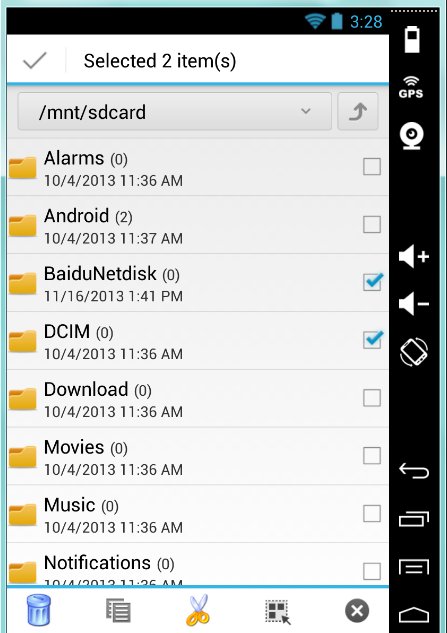
Step1: Check or unchecked the file or directory. It will show the toolbar-"delete,cut,copy,select"...ect. Do it what you want to do.
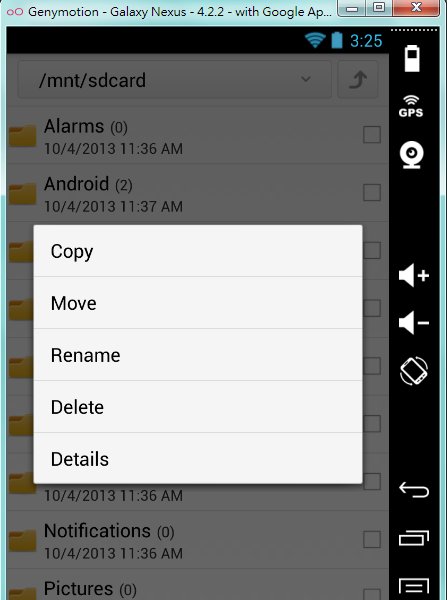
Step2: Touch the file or directory for a moment.It will show the toolbar-"rename,cut,delete,copy,detail". Do it what you want to do.
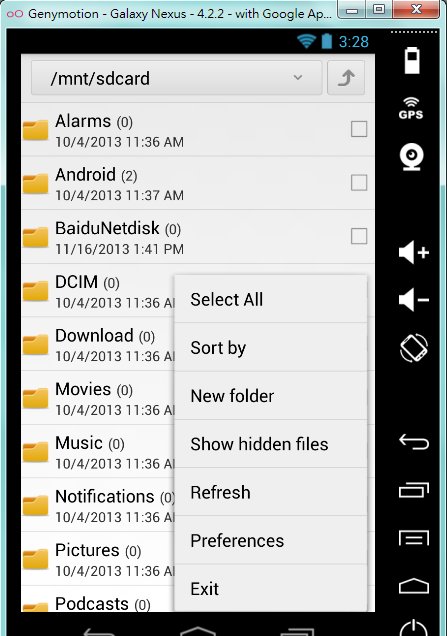
Step3: Clicking the 『Menu key』.It will show the toolbar-"Sort,Create New Fold,refresh,preferences".Do it what you want to do.
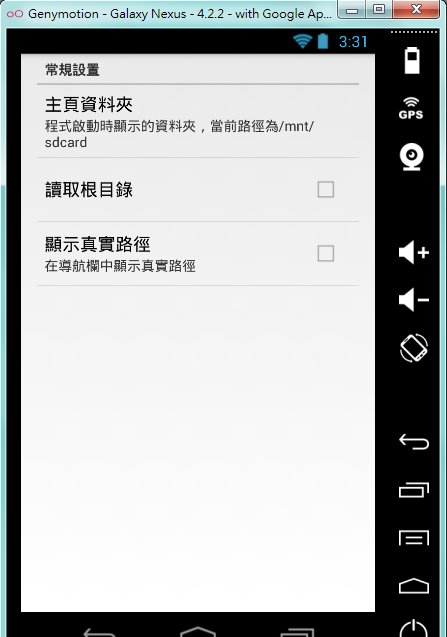
If you want to read the root directory,You can choose toolbar "the preferences".And check the "Read Root".
If you want to exit the program,firstly,you must go the to main sd directory by clicking the 『Return key』of your mobile device.
And press the 『Return key』 again.Then you'll exit the program.





¡Un clic para instalar archivos XAPK/APK en Android!

¡Gracias por tu valoración y comentarios!
YYa has valorado.