








Thanks for your rating and feedback!
You have already rated.

DIY remote access and monitoring for DSC panels using the envisalink card
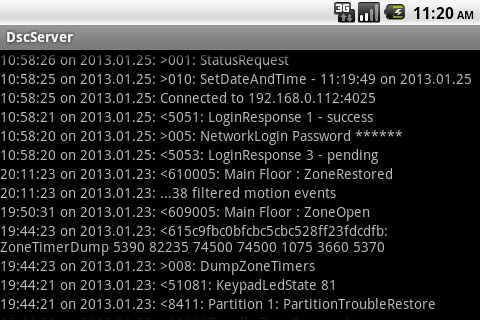
This server works a proxy for the Envisalink 2DS/EVL3/EVL4 card connected to a DSC Alarm Panel. It will allow you to, among other things, self monitor your alarm system and allows your phone to work as part of your home monitoring and home automation system. You can remotely access your alarm system from anywhere your phone can access the internet. Use of the EYEZ-ON service is also highly recommended but is not required.
For real time monitoring of your security system you must allow foreground notifications as the app must run in the foreground to keep the TCP connection to the envisalink active. The DscServer runs on a dedicated, always on, always connected android phone or tablet running within your network.
Using it, multiple instances of the DscKeypad App and DscKeypad widgets (included) or other similar applications (such as Mi Casa Verde Vera or other automation products) may connect simultaneously using the "fan-out" capability provided. The DscServer appears to any client as a faster version of the Envisalink card itself with some additional capabilities (e.g. zone and partition labels).
This is a sophisticated server with many capabilities and requires some expertise to configure. I am happy to assist as needed. I do offer a full refund if you're unable to get it to work in your environment or are not satisfied in any way.
Features:
o NEW: Use with iPhone HomeKit & Siri (AutomationManager for IoT + HomeBridge for AutomationManager)
o NEW: Google Home, Amazon Echo voice support with full IFTTT integration
o NEW: Full integration with "AutomationManager for IoT". DSC partition, zone, and panel status are available as sensors in the rule engine, and panel commands can be sent to the DscServer allowing easy integration with your home automation.
o Full logging persisted on Google Drive
o Secure, encrypted remote access using your phone or a web browser
o Multiple simultaneous connected clients
o System status cached and trimmed to active zones/partitions to reduce network and client load
o A centralized location for customizing your system such as zone and partition labels.
o self monitoring with immediate email or SMS notifications:
- alarms and trouble
- configurable zone opening/restore
- loss of connection with the Envisalink card
- phone/tablet power loss (will continue on battery)
- phone/tablet low battery warning
- phone/tablet connectivity loss
- midnight status check-in (to confirm connectivity daily)
- use security events to trigger actions such as posting a web site (e.g. to turn video recording or motion detecting on/off, changing the temperature in a wifi thermostat, turning), send an android intent to other android apps (e.g. my Wemo app to control your lights), etc.
- and much more...
o customizable content for eMail, SMS, UDP messages
o Enables home automation - send the DSC application commands using android intents from Tasker, Automagic, etc.
o On screen widgets for submitting custom commands (locally or remotely)
o NFC support to send custom commands, including arm/disarm, etc.
Remember, DO NOT expose your Envisalink IP connection to an unprotected network; communication provided by the card is not secure. Expose (port forward) the secure port (only) to outside your secure network (after registering the clients you will allow).



One-click to install XAPK/APK files on Android!
Thanks for your rating and feedback!
You have already rated.