Sichere und schnelle APK-Downloads auf APKPure
Mit APKPure können Sie iCMP Ping APK einfach und sicher mit Signaturüberprüfung herunterladen.

iCMP Ping-Netzwerk-Tools und die vollständigste für Android-Geräte
Diese App ist ein Dutzend kostenlose Netzwerk-Tools einschließlich: WiFi-Scanner, Port-Scanner, DNS-Lookup, Ping-Dienstprogramm, Service-Überwachung wie Netzwerk-Tools Dienstprogramm.
Die App "iCMP Ping" verfügt über zwei Verbindungsmodi:
1. Modus verbunden mit WiFi.
2. Modus an 2G, 3G, 4G, 5G oder höher angeschlossen.
Die App "iCMP Ping" enthält das folgende Tools-Dienstprogramm:
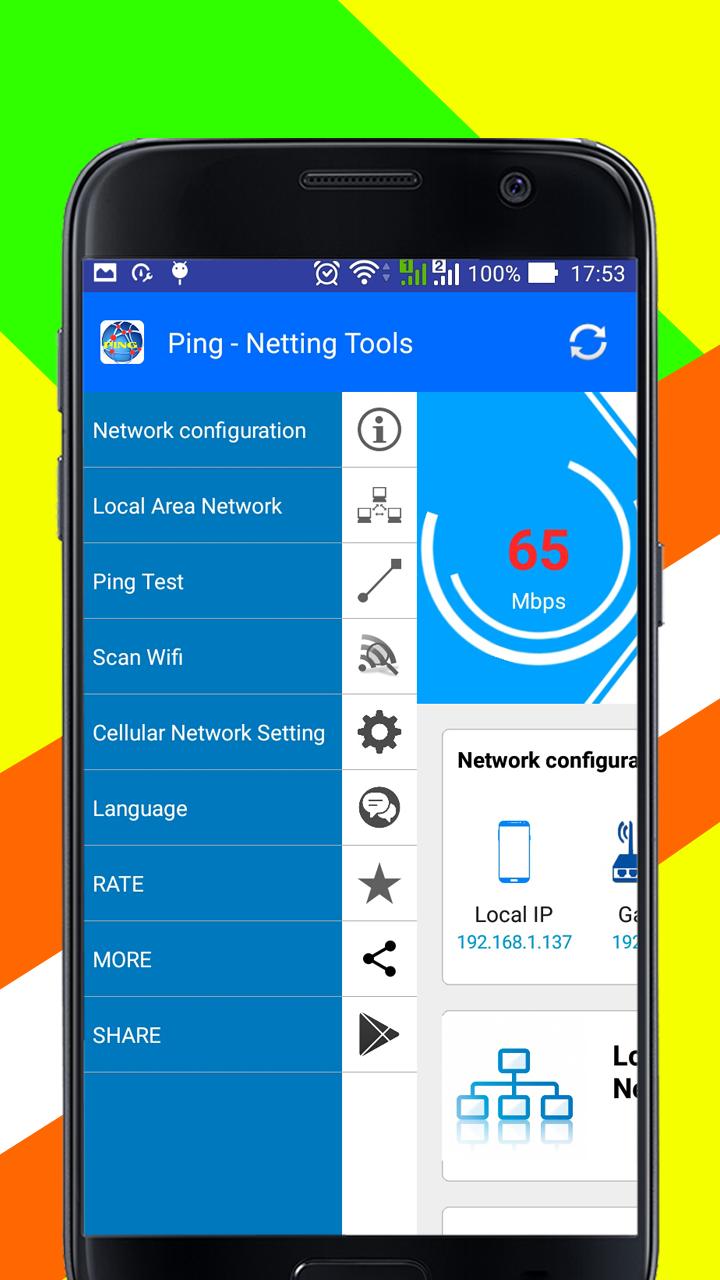
1- Netzwerkkonfiguration: Scannen Sie auf Ihrem Gerät die lokale IP-Adresse, Gateway, externe IP, SSDI, BSSDI, RSSI und Hersteller.
2. WiFi-Scanner / Mobiler Scanner: Wählen Sie WLAN (oder 2G, 3G, 4G, 5G), um das WLAN-Netzwerk anzuschließen, um die Verbindungsinformationen und die Verbindungsgeschwindigkeit anzuzeigen.
3. Local-Area Network: Scannen Sie auf Ihrem Gerät, um alle Geräte in Ihrem Netzwerk anzuzeigen
4. Ping-Test: System-Ping - ICMP-, TCP- und HTTP-Ping.
Wenn Ihr Android-Gerät mit WiFi oder 2G, 3G, 4G, 5G oder höher verbunden ist, ist die Hauptfunktion der Anwendung "iCMP Ping" wie folgt:
1. Info: Entdecken Sie alle Geräte, die an ein beliebiges Netzwerk angeschlossen sind:
- HostName.
- IPv6-Adresse (EUI-64)
- IPv6-Adresse
- IPv6-Adresse (Link-Local, EUI-64)
- IPv4-Adresse
- Netzmaske
- Boadcast
- MAC-Adresse
- Gateway
- DNS Lookup und Reverse DNS Lookup
- Externe IP
2. Local-Area Network
- IP-Rechner
- Externe IP
- Subnet-Scanner
3. WiFi Einstellung:
- Wählen Sie WiFi, um sich auf Ihrem Handy zu verbinden.
- Zeigt die Verbindungsinformationen, Verbindungsgeschwindigkeitstest an.
4. Ping-Test: Netzwerkmonitor: Gerät Online- und Offline-Tracking
- System Ping TCP
- System Ping HTTP, Browser
- System Ping IP-Adressen.
5. Verbindung einstellen
- Wählen Sie das Mobilfunknetz, um eine Verbindung herzustellen: WiFi-Verbindung oder 2G-, 3G-, 4G-, 5G-Verbindung.
- Wahl des bevorzugten Netzwerkmodus: LTE / WCDMA / GSM
- Netzwerkdienstanbieter
EMPFEHLUNG:
(*) Diese App funktioniert gut von Android Version 4.4 Kit Kat und höher.
(*) Abhängig davon, ob Sie das Mobilfunknetz zum Anschluss der WiFi-Verbindung oder 2G-, 3G-, 4G-, 5G-Verbindung wählen, scannt und zeigt die App verschiedene Informationen an.
Beginnen Sie jetzt mit dem Testen des Tests auf Ihrem Android-Gerät mit der Anwendung "iCMP Ping".
Vielen Dank.
This app is a dozen free network tools including: WiFi scanner, port scanner, DNS lookup, ping utility, service monitoring such as network tools utility.
The App "iCMP Ping" has two connection modes:
1. Mode connected to WiFi.
2. Mode connected to 2G, 3G, 4G, 5G or higher.
The app "iCMP Ping" contains the following tools utility:
1- Network Configuration: Scan on your device to display the Local IP address, Gateway, External IP, SSDI, BSSDI, RSSI, and Manufacturer.
2. WiFi Scanner/ Mobile Scanner: Select WiFi (or 2G, 3G, 4G, 5G) to connect the Wifi network to display the connection information, connection speed.
3. Local-Area Network: Scan on your device to shows all devices on your network
4. Ping Test: System ping - ICMP, TCP and HTTP ping.
If your android device is connected to WiFi or 2G, 3G, 4G, 5G or higher the main function of the application "iCMP Ping" is as follows:
1. Info: Discover all devices connected to any network:
- HostName.
- IPv6 address (EUI-64)
- IPv6 address
- IPv6 address (Link-Local, EUI-64)
- IPv4 address
- Netmask
- Boadcast
- MAC address
- Gateway
- DNS Lookup and reverse DNS lookup
- External IP
2. Local-Area Network
- IP Calculator
- External IP
- Subnet scanner
3. WiFi Setting:
- Choose WiFi to connect on your mobile.
- Display the connection information, connection speed test.
4. Ping Test: Network Monitor: device online and offline tracking
- System Ping TCP
- System Ping HTTP, browser
- System Ping IP addresses.
5. Setting Connection
- Select mobile network to connect: WiFi connection or 2G, 3G, 4G, 5G connection.
- Selecting preferred network mode: LTE/WCDMA/GSM
- Network Service Providers



Ein Klick zur Installation von XAPK/APK-Dateien auf Android!

Vielen Dank für Ihre Bewertung und Ihr Feedback!
Sie haben bereits bewertet.