
Waze Cyclist Alerts: How the Garmin Warning Works
Waze now shows cyclists on the map using Garmin LiveTrack. What drivers see, how riders opt in, and why most roads will stay empty for a while.



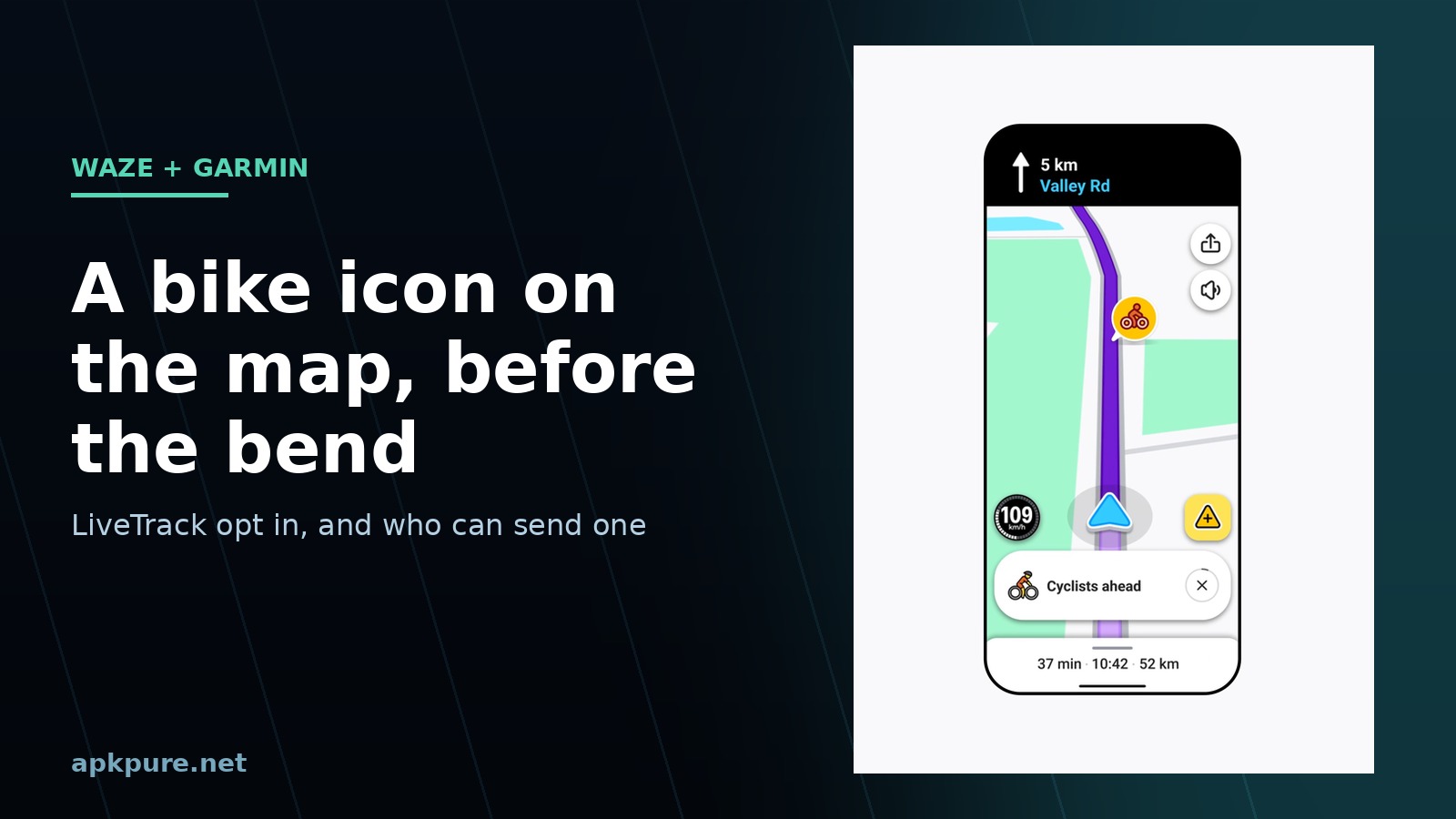
Waze started showing cyclists on the map on November 10, and the source of that dot isn't a phone in someone's pocket. It's a Garmin bike computer or watch broadcasting its position through LiveTrack.
Google's announcement calls the rollout global, on both Android and iOS, and that's as specific as it gets about where the feature works. What's missing is a country list, a device list and any kind of date. So the honest version is this: the feature exists now, it's arriving in waves, and there's nothing to install beyond the current Waze build.
Here's what shows up on screen, how a rider gets on the map, and what the whole thing does and doesn't reveal.
What drivers actually see
Two things appear, and neither is a pop-up ad.
A bike icon moves along the road ahead of you on the map, roughly where the rider is. At the same time a banner slides into the driving view saying that cyclists are ahead. Waze's own promo image shows exactly that combination: a small cyclist marker on the route and a pill-shaped alert at the bottom of the screen.
The alert is temporary. It appears while the rider is near your route and disappears when they're gone. It also dies the moment the cyclist ends the ride on the Garmin device, which is the part that keeps this from turning into a permanent map of every bike in the city.
There's no list of past cyclists, no way to tap the icon for details, and no history. It's closer to a hazard warning than to a live traffic layer. Which is the point.
Where the position comes from
The data comes from Garmin LiveTrack, the live location sharing feature that ships with Garmin Edge bike computers and Garmin smartwatches. LiveTrack has existed for years as a way to send a private link to family so they can watch your ride progress, and Waze is simply a second destination for that same feed.
That matters for two reasons. First, the accuracy is Garmin's GPS, not a phone in a jersey pocket, so the icon lands where the rider actually is. Second, no Garmin device means no broadcast. This isn't Waze detecting bicycles with cameras or reading motion data from other phones.
The rider chooses to share. Nothing appears on the Waze map unless the cyclist turns the option on, and the same switch turns it off again. No exceptions, no default-on.
How a cyclist appears on the Waze map
The control lives inside LiveTrack, so you set it up the same way you'd set up any LiveTrack session.
- Make sure the Garmin device is paired with Garmin Connect on your phone and has a GPS fix before you start.
- Start LiveTrack the usual way, either from the device's ride menu or from Garmin Connect under the device's safety and tracking settings.
- In the LiveTrack sharing options, look for the Waze entry and switch it on. Garmin hasn't published a fixed menu path, and the label shifts between Edge computers and watches, so look for Waze by name rather than a specific position in the list.
- Start the ride. Your position should now be visible to nearby Waze users as a moving bike icon.
- End the ride as normal. The Waze alert disappears with the session.
Two conditions have to hold for this to work. The Garmin device needs a live connection to Garmin Connect through your phone, and the phone needs data, which is the same requirement that already makes any LiveTrack link go stale in a tunnel. A dead zone produces nothing at all.
What the alert never shows
Waze's wording is unusually specific for a location feature, and it's worth quoting rather than paraphrasing: drivers only see a temporary alert that a cyclist is nearby, never information about a specific cyclist or route.
Translated into what's on your screen, that means no name, no photo, no speed, no destination, no ride history, and no way to follow the rider after the alert clears. The icon is a position, not a profile.
For the cyclist, the trade is straightforward. You're publishing your current location to every Waze user within range for the length of your ride, and nothing else. If that's too much, leave the option off. Your LiveTrack link to family still works exactly as before, private URL and all.
Do drivers need to change any settings?
Not really, and that's the unusual part. There's no Waze safety feature to hunt for in the settings menu, no toggle to enable, and no subscription attached.
What you need is a current app build. If your last Waze update landed in the summer, the code that draws the cyclist icon simply isn't there yet.
- Open the Play Store and search for Waze.
- Tap Update if it's offered. If the button reads Open, you're current.
- Launch the app and start a route. The alert shows up on its own when a rider is nearby.
If Play isn't available in your country, the current APK from APKPure installs the same build. Android asks for permission once.
One practical note about the screen. The warning is drawn inside the driving view, so it's visible while Waze is in front of you. A phone face-down in the cupholder won't help anyone, which is also true of every other alert Waze produces.
If you don't own a Garmin device
Drivers get the benefit either way. The alerts come from other people's trackers, so a phone mount and the current app are the whole requirement on your side.
Cyclists without Garmin hardware can't broadcast, and there's no phone-only equivalent in this launch. If you ride with just a phone, the feature is something you'll see from the other seat. For group rides, Garmin's own LiveTrack link sharing still does the family-and-friends job it always did, just without the Waze layer.
This is also why the feature will feel patchy at first. A bike icon only appears when a rider nearby happens to own the right hardware and has switched the option on, so the map fills in slowly and unevenly rather than all at once. On a busy cycle route in a city with a big Garmin customer base, that could be most weekend mornings. On a rural road at 6 a.m., probably nobody.
Is this a substitute for riding visibly?
Not even close. Waze is a driving app first: cycling navigation isn't a mode you switch on inside it, and this launch doesn't add one. The alert tells a driver that someone on a bike is ahead. It doesn't change closing speed, it doesn't work if the driver isn't running Waze, and it does nothing about the rider who left the Garmin at home.
Think of it as one more input, like a hazard report. Useful, free, and dependent on other people opting in. Lights, a bell and taking the lane still do more for your survival than any icon on someone else's screen.
Rollout, coverage and what to do if you see nothing
Google says cycling alerts powered by Garmin are rolling out now globally on Android and iOS. Neither company published a list of supported countries, a minimum app version, or a completion date, and Garmin hasn't said which of its watches and computers are included beyond the general Edge and smartwatch wording.
If you've updated Waze and still don't see an alert on a route where you'd expect cyclists, the likely explanations are boring ones. No opted-in rider was nearby. The rider's LiveTrack session had ended. Your build is older than the rollout wave reaching your account.
Wait a few weeks. Server-side features like this usually arrive per account, not per download. Nothing is broken.



Waze is a real-time GPS navigation app designed for drivers.

FAQs
- Do I need a Garmin device to see cyclist alerts in Waze?
- No. Drivers only need the current Waze app. The Garmin hardware is on the cyclist's side, because the location comes from LiveTrack on an Edge computer or a Garmin watch.
- Can I turn the cyclist alerts off as a driver?
- Google hasn't described a driver-side switch. The alerts are temporary, anonymous and tied to a rider's active session, so they stop when that ride ends.
- Does Waze show who the cyclist is?
- No. Drivers see a moving icon and a short warning, with no name, route, speed or history attached.