APKPure پر محفوظ اور تیز APK ڈاؤن لوڈ کریں
APKPure آپ کے لئے وائرس سے پاک Thief Catcher APK ڈاؤن لوڈ میسر کرنے کے لئے سائنیچر تصدیق استعمال کرتا ہے۔

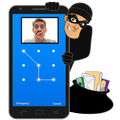
Thief Catcher taking a Photo every time someone tries to unlock your phone
Thieves and Intruders are trying to unlock your phone and steal data in your absence? Thief Catcher comes to rescue by taking a Photo every time someone tries to unlock your phone unsuccessfully. When you successfully unlock the phone, Intruders photos are launched with timestamp for you to catch them.
Thief Catcher is easy to use.
1. Enable Thief Catcher to monitor screen unlock attempts (We need this to be able to detect unsuccessful attempts to unlock your device).
2. Make sure you Password protect you lock screen.
You are ready to go. Anytime anyone else tries to unlock the phone, Thief Catcher will take a photo and store it. When you unlock the device, Thief Catcher will display photos to you.
Thief Capture works by setting app as Device Administrator. If you want to uninstall the app, please follow steps below:
1) Go to Settings (Your phone settings)
2) Click on Security
3) Click on Device Administrator. You will notice Thief Catcher as a Device Administrator. Uncheck Thief Catcher. Now you will be able to uninstall the app.



Android پر XAPK/APK فائلیںانسٹالکرنےکےلیےایککلککریں!

آپ کی درجہ بندی اور آراء کا شکریہ!
آپ پہلے ہی درجہ بندی کر چکے ہیں۔