Package Name:app.atomofiron.blockclock
Show More

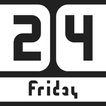
A modern clock and date widget for your home screen.
This app offers a fresh take on clock widgets. A clean, minimalist design crafted in line with current Android design trends seamlessly fits into any theme and home screen setup.
Key Features:
• Modern Aesthetics: Up-to-date style instead of outdated classic looks.
• All-in-One Customization: Full appearance customization (color schemes, transparency, styles) is available directly inside the app.
• Quick Shortcuts: Native functionality acting as convenient shortcuts to open your system alarm clock or calendar.
• Lightweight & Battery Friendly: Optimized performance with minimal battery drain and zero data collection.
How to add the widget to your home screen:
• Touch and hold an empty space on your home screen.
• Tap "Widgets".
• Find Block Clock in the list and drag the desired widget to your screen.



One-click to install XAPK/APK files on Android!

Thanks for your rating and feedback!
You have already rated.